

Commons:Featured picture candidates
Other featured candidates
📽️ Media

|
Featured picture candidates  Featured picture candidates are images that the community will vote on, to determine whether or not they will be highlighted as some of the finest on Commons. This page lists the candidates to become featured pictures. The picture of the day images are selected from featured pictures. Old candidates for featured pictures are listed in the log pages and in the candidate archives. There are also chronological lists of featured pictures: 2004, 2005, 2006, 2007, 2008, 2009, 2010, 2011, 2012, 2013, 2014, 2015, 2016, 2017, 2018, 2019, 2020, 2021, 2022, 2023, 2024, 2025, 2026 and current month. For another overview of our finest pictures, take a look at our annual picture of the year election. |
|||||||||||||||||||
Formal thingsNominatingGuidelines for nominatorsPlease read the complete guidelines before nominating. This is a summary of what to look for when submitting and reviewing FP candidates:
Artworks, illustrations, and historical documentsThere are many different types of non-photographic media, including engravings, watercolors, paintings, etchings, and various others. Hence, it is difficult to set hard-and-fast guidelines. However, generally speaking, works can be divided into three types: Those that can be scanned, those that must be photographed, and those specifically created to illustrate a subject. Works that must be photographed include most paintings, sculptures, works too delicate or too unique to allow them to be put on a scanner, and so on. For these, the requirements for photography, below, may be mostly followed; however, it should be noted that photographs which cut off part of the original painting are generally not considered featurable. Works that may be scanned include most works created by processes that allow for mass distribution − for instance, illustrations published with novels. For these, it is generally accepted that a certain amount of extra manipulation is permissible to remove flaws inherent to one copy of the work, since the particular copy – of which hundreds, or even thousands of copies also exist – is not so important as the work itself. Works created to serve a purpose include diagrams, scientific illustrations, and demonstrations of contemporary artistic styles. For these, the main requirement is that they serve their purpose well. Provided the reproduction is of high quality, an artwork generally only needs one of the following four things to be featurable:
Digital restorations must also be well documented. An unedited version of the image should be uploaded locally, when possible, and cross-linked from the file description page. Edit notes should be specified in detail, such as "Rotated and cropped. Dirt, scratches, and stains removed. Histogram adjusted and colors balanced." PhotographsOn the technical side, we have focus, exposure, composition, movement control and depth of field.
On the graphic elements we have shape, volume, color, texture, perspective, balance, proportion, noise, etc.
You will maximise the chances of your nominations succeeding if you read the complete guidelines before nominating. Video and audioPlease nominate videos, sounds, music, PDFs, etc. at Commons:Featured media candidates. Set nominationsIf a group of images are thematically connected in a direct and obvious way, they can be nominated together as a set. A set should fall under one of the following types:
Adding a new nominationIf you believe that you have found or created an image that could be considered valuable, with appropriate name, quality, image description, categories and licensing, then do the following. Step 1: copy the image name into this box, after the text already present in the box, for example, Commons:Featured picture candidates/File:Your image filename.jpg. Then click on the "create new nomination" button. All single files: For renominations, simply add /2 after the filename. For example, Commons:Featured picture candidates/File:Foo.jpg/2
All set nomination pages should begin "Commons:Featured picture candidates/Set/", e.g. "Commons:Featured picture candidates/Set/My Nomination".
Step 3: manually insert a link to the created page at the top of Commons:Featured picture candidates/candidate list: Click here, and add the following line to the TOP of the nominations list:
Nominations are time-sensitive and for one-time use only. An automatic clock starts as soon as they are created. Do not create them in advance, save them for later or re-activate them. Galleries and FP categories: Please add a gallery page and section heading from the list at Commons FP galleries. Write the code as Page name#Section heading. For example: Optional: if you are not the creator of the image, please notify them using
An 'Alternative' is created by adding a sub-section to the nomination page: ====Alternative==== VotingEditors whose accounts have at least 10 days and 100 constructive, stable edits on Commons (excluding user and talk pages) can vote. Everybody can vote for their own nominations. Anonymous (IP) votes are not allowed. You may use the following templates:
You may indicate that the image has no chance of success with the template {{FPX|reason - ~~~~}}, where reason explains why the image is clearly unacceptable as a FP. The template can only be used when there are no support votes other than the one from the nominator. A well-written review helps participants (photographers, nominators and reviewers) improve their skills by providing insight into the strengths and weaknesses of a picture. Explain your reasoning, especially when opposing a candidate (which has been carefully selected by the author/nominator). English is the most widely understood language on Commons, but any language may be used in your review. A helpful review will often reference one or more of the criteria listed above. Unhelpful reasons for opposing include:
Remember also to put your signature (~~~~). Featured picture delisting candidatesOver time, featured picture standards change. It may be decided that for some pictures which were formerly "good enough", this is no longer the case. This is for listing an image which you believe no longer deserves to be a featured picture. For these, vote:
This can also be used for cases in which a previous version of an image was promoted to FP, but a newer version of the image has been made and is believed to be superior to the old version, e.g. a newly edited version of a photo or a new scan of a historical image. In particular, it is not intended for replacing older photos of a particular subject with newer photos of the same subject, or in any other case where the current FP and the proposed replacement are essentially different images. For these nominations, vote:
If you believe that some picture no longer meets the criteria for FP, you can nominate it for delisting, copying the image name into this box, after the text already present in the box: In the new delisting nomination page just created you should include:
After that, you have to manually insert a link to the created page at the top of Commons:Featured picture candidates/candidate list. As a courtesy, leave an informative note on the talk page(s) of the original creator, uploader(s), and nominator with a link to the delisting candidate. {{subst:FPC-notice-removal}} can be used for this purpose. Featured picture candidate policyGeneral rules
Featuring and delisting rulesA candidate will become a featured picture in compliance with following conditions:
The delisting rules are the same as those for FPs, with voting taking place over the same time period. The rule of the 5th day is applied to delisting candidates that have received no votes to delist, other than that of the proposer, by day 5. The FPCBot handles the vote counting and closing in most cases, current exceptions are candidates containing multiple versions (“alternatives”) of the image as well as delist-and-replace nominations. Any experienced user may close the requests not handled by the bot. For instructions on how to close nominations, see Commons:Featured picture candidates/What to do after voting is finished. Also note that there is a manual review stage between when the bot has counted the votes and before the nomination is finally closed by the bot; this manual review can be done by any user familiar with the voting rules. Hint: Until summer 2025, the bot was also not able to process FPXed, FPDed and withdrawn nominations as well as delist nominations; this has been fixed, users do not need to close such nominations anymore. Above all, be politePlease don't forget that the image you are judging is somebody's work. Avoid using phrases like "it looks terrible" and "I hate it". If you must oppose, please do so with consideration. Also remember that your command of English might not be the same as someone else's. Choose your words with care. Happy judging… and remember… all rules can be broken. See also
| |||||||||||||||||||


Table of contents
Featured picture candidates
Voting period ends on 21 May 2026 at 13:09:25 (UTC) (unless closed by the 5th-day rule)
Voters must check: File name · Quality · Image description · License · Categories (what, where, who, when)
Visit the nomination page to add or modify image notes.

- Gallery: Commons:Featured pictures/Plants#Family : Apiaceae (Carrot family)
 Info created by Petro Stelte – uploaded by Petro Stelte – nominated by Petro Stelte -- Petro Stelte (talk) 13:09, 12 May 2026 (UTC)
 Support I have nothing to lose. -- Petro Stelte (talk) 13:09, 12 May 2026 (UTC)
.svg/20px-Pictogram_voting_comment_(orange).svg.png?utm_source=commons.wikimedia.org&utm_campaign=parser&utm_content=thumbnail) Comment - Personally, I think I'd crop a bit closer on the sides (remove the brown) and increase the exposure slightly. Definitely has potential, though. — Chris Woodrich (talk) 14:04, 12 May 2026 (UTC)
Comment - Personally, I think I'd crop a bit closer on the sides (remove the brown) and increase the exposure slightly. Definitely has potential, though. — Chris Woodrich (talk) 14:04, 12 May 2026 (UTC)
- Would that be better? [1] Petro Stelte (talk) 14:47, 12 May 2026 (UTC)
Voting period ends on 20 May 2026 at 18:31:48 (UTC) (unless closed by the 5th-day rule)
Voters must check: File name · Quality · Image description · License · Categories (what, where, who, when)
Visit the nomination page to add or modify image notes.

- Gallery: Commons:Featured pictures/Animals/Birds#Family : Cuculidae (Cuckoos)
- Info Cuculus canorus, England. Created by Andy Morffew – uploaded/nominated by me --Юрий Д.К. 18:31, 11 May 2026 (UTC)
- Support --Юрий Д.К. 18:31, 11 May 2026 (UTC)
- Comment Incredible to see a cuckoo in the open like this. Charlesjsharp (talk) 20:27, 11 May 2026 (UTC)
- Support -- hockei (talk) 05:52, 12 May 2026 (UTC)
- Support --Ermell (talk) 07:28, 12 May 2026 (UTC)
- Support --Uoaei1 (talk) 09:04, 12 May 2026 (UTC)
- Support —Bruce1eetalk 10:02, 12 May 2026 (UTC)
- Support — Chris Woodrich (talk) 14:04, 12 May 2026 (UTC)
- Support --Berthold Werner (talk) 15:03, 12 May 2026 (UTC)
- Support --The Cosmonaut (talk) 15:59, 12 May 2026 (UTC)
Voting period ends on 20 May 2026 at 10:27:51 (UTC) (unless closed by the 5th-day rule)
Voters must check: File name · Quality · Image description · License · Categories (what, where, who, when)
Visit the nomination page to add or modify image notes.

- Gallery: Commons:Featured_pictures/Plants#Family_:_Plantaginaceae
- Info This close-up shows the inflorescence of the Germander speedwell (Veronica chamaedrys) with its characteristic deep-blue flowers, measuring around 8 to 12 mm in diameter, and their striking white centres. The image highlights the plant’s typical two-rowed hairiness on the stem, as well as the fine veining of the petals, set against a softly rendered background. Captured in the landscape protected area 'Pfälzische Rheinauen' in the South Palatinate, Germany. Created, uploaded and nominated by me -- Achim Lammerts • Syntaxys (talk) 10:27, 11 May 2026 (UTC)
 Abstain as author -- Achim Lammerts • Syntaxys (talk) 10:27, 11 May 2026 (UTC)
- Support Very nice --Uoaei1 (talk) 10:51, 11 May 2026 (UTC)
- Support --Ermell (talk) 07:29, 12 May 2026 (UTC)
- Support --The Cosmonaut (talk) 15:59, 12 May 2026 (UTC)
Voting period ends on 20 May 2026 at 09:48:29 (UTC) (unless closed by the 5th-day rule)
Voters must check: File name · Quality · Image description · License · Categories (what, where, who, when)
Visit the nomination page to add or modify image notes.
_am_Belchengipfel_02.jpg)
- Gallery: Commons:Featured pictures/Animals/Birds/Passeriformes#Family_:_Alaudidae_(Larks)
- Info all by Stephan Sprinz -- Stephan Sprinz (talk) 09:48, 11 May 2026 (UTC)
- Support -- Stephan Sprinz (talk) 09:48, 11 May 2026 (UTC)
- Support --Uoaei1 (talk) 10:54, 11 May 2026 (UTC)
- Support --Ermell (talk) 07:30, 12 May 2026 (UTC)
- Support --The Cosmonaut (talk) 16:00, 12 May 2026 (UTC)
Voting period ends on 20 May 2026 at 08:12:46 (UTC) (unless closed by the 5th-day rule)
Voters must check: File name · Quality · Image description · License · Categories (what, where, who, when)
Visit the nomination page to add or modify image notes.

- Gallery: Commons:Featured_pictures/People#Traditions
- Info created by Skander zarrad – uploaded by Skander zarrad – nominated by Ovva olfa -- Olfa Yakoubi -ألفة يعقوبي (talk) 08:12, 11 May 2026 (UTC)
- Support -- Olfa Yakoubi -ألفة يعقوبي (talk) 08:12, 11 May 2026 (UTC)
- Support --Uoaei1 (talk) 10:53, 11 May 2026 (UTC)
Voting period ends on 20 May 2026 at 07:23:04 (UTC) (unless closed by the 5th-day rule)
Voters must check: File name · Quality · Image description · License · Categories (what, where, who, when)
Visit the nomination page to add or modify image notes.
.jpg)
- Gallery: Commons:Featured pictures/Objects/Sculptures#Sculptures indoors
- Info Passion of Jesus (Pieta from 1400−1410, National Gallery Slovenia. Unknown creator, my shot. -- Mile (talk) 07:23, 11 May 2026 (UTC)
- Support -- Mile (talk) 07:23, 11 May 2026 (UTC)
 Question Bottom crop is too short. Could you offer more? Yann (talk) 18:42, 11 May 2026 (UTC)
- Comment @Yann Not in bottom, croped was just above. --Mile (talk) 09:00, 12 May 2026 (UTC)
- Support --heylenny (talk/edits) 00:36, 12 May 2026 (UTC)
Voting period ends on 20 May 2026 at 07:16:02 (UTC) (unless closed by the 5th-day rule)
Voters must check: File name · Quality · Image description · License · Categories (what, where, who, when)
Visit the nomination page to add or modify image notes.

- Gallery: Commons:Featured pictures/Places/Architecture/Exteriors#Belgium
- Info created by JackyM59 – uploaded by JackyM59 – nominated by JackyM59 -- JackyM59 (talk) 07:16, 11 May 2026 (UTC)
- Support -- JackyM59 (talk) 07:16, 11 May 2026 (UTC)
- Support Excellent achievement. It looks like an impressionist painting, with a stunning composition. The canoeists add a much to the peaceful mood. The river, the trees and the monuments are well balanced and mixed. I like this very french landscape ! And I wish many supports for it !--Jebulon (talk) 20:59, 11 May 2026 (UTC)
- Support though I feel the highlights could be reduced slightly. — Chris Woodrich (talk) 14:07, 12 May 2026 (UTC)
Voting period ends on 20 May 2026 at 06:15:41 (UTC) (unless closed by the 5th-day rule)
Voters must check: File name · Quality · Image description · License · Categories (what, where, who, when)
Visit the nomination page to add or modify image notes.

- Gallery: Commons:Featured pictures/Animals/Birds/Passeriformes#Family_:_Cisticolidae_(Cisticolas)
- Info All by -- Tisha Mukherjee (talk) 06:15, 11 May 2026 (UTC)
- Support -- Tisha Mukherjee (talk) 06:15, 11 May 2026 (UTC)
- Support --Uoaei1 (talk) 10:56, 11 May 2026 (UTC)
- Support Cmao20 (talk) 16:35, 11 May 2026 (UTC)
- Support -- hockei (talk) 05:55, 12 May 2026 (UTC)
- Support --Ermell (talk) 07:32, 12 May 2026 (UTC)
- Support very good and detailed capture --Achim Lammerts • Syntaxys (talk) 13:32, 12 May 2026 (UTC)
- Support — Chris Woodrich (talk) 14:08, 12 May 2026 (UTC)
- Support --The Cosmonaut (talk) 16:01, 12 May 2026 (UTC)
Voting period ends on 20 May 2026 at 04:19:22 (UTC) (unless closed by the 5th-day rule)
Voters must check: File name · Quality · Image description · License · Categories (what, where, who, when)
Visit the nomination page to add or modify image notes.
_19.jpg)
- Gallery: Commons:Featured pictures/Natural phenomena/Weather#Fog
- Info Put van Nederhorst in the mist. Road along the lake in the mist. The path seems to disappear into the mist in an S-bend.
All by -- Famberhorst (talk) 04:19, 11 May 2026 (UTC) - Support -- Famberhorst (talk) 04:19, 11 May 2026 (UTC)
- Support --Thi (talk) 08:50, 11 May 2026 (UTC)
- Support Calming Cmao20 (talk) 16:29, 11 May 2026 (UTC)
- Support —Bruce1eetalk 10:00, 12 May 2026 (UTC)
Voting period ends on 20 May 2026 at 00:03:16 (UTC) (unless closed by the 5th-day rule)
Voters must check: File name · Quality · Image description · License · Categories (what, where, who, when)
Visit the nomination page to add or modify image notes.
._LOC_2003623399.jpg)
- Gallery: Commons:Featured pictures/Non-photographic media/Maps#Maps of North America
- Info created by Johannes Vingboons – uploaded by Fæ – nominated by ★ -- ★ 00:03, 11 May 2026 (UTC)
- Support -- ★ 00:03, 11 May 2026 (UTC)
- Support --heylenny (talk/edits) 00:38, 12 May 2026 (UTC)
- Support --The Cosmonaut (talk) 16:03, 12 May 2026 (UTC)
Voting period ends on 19 May 2026 at 17:49:55 (UTC) (unless closed by the 5th-day rule)
Voters must check: File name · Quality · Image description · License · Categories (what, where, who, when)
Visit the nomination page to add or modify image notes.

- Gallery: Commons:Featured pictures/Places/Natural#Malta
- Info: Inland Sea, the saltwater lagoon on the island of Gozo; all by -- The Cosmonaut (talk) 17:49, 10 May 2026 (UTC)
- Support -- The Cosmonaut (talk) 17:49, 10 May 2026 (UTC)
 Weak oppose QI for sure but the light isn't as nice as your other nomination and also I think the image quality is borderline - I can see posterisation on the bright reds and blues, and the sharpness isn't as good as I'd like. So overall this tips me into oppose, sorry. Cmao20 (talk) 02:54, 11 May 2026 (UTC)
 Done: thank you for the feedback; new version uploaded with improved sky appearacne. --The Cosmonaut (talk) 15:50, 12 May 2026 (UTC)
Voting period ends on 19 May 2026 at 17:49:51 (UTC) (unless closed by the 5th-day rule)
Voters must check: File name · Quality · Image description · License · Categories (what, where, who, when)
Visit the nomination page to add or modify image notes.

- Gallery: Commons:Featured pictures/Places/Natural#Malta
- Info: Wied il-Għasri sea canyon, Gozo; all by -- The Cosmonaut (talk) 17:49, 10 May 2026 (UTC)
- Support -- The Cosmonaut (talk) 17:49, 10 May 2026 (UTC)
Comment excellent light, sharpness and composition. But some artefacts (rocks and water) in the left corner below prevents me of a support. do you think you could correct ?--Jebulon (talk) 19:13, 10 May 2026 (UTC)
- Done: thank you for the feedback, I've touched up that corner, should look better now. --The Cosmonaut (talk) 20:19, 10 May 2026 (UTC)
- Support Nice view Cmao20 (talk) 02:53, 11 May 2026 (UTC)
- Support --Famberhorst (talk) 15:49, 11 May 2026 (UTC)
- Support --Ermell (talk) 07:36, 12 May 2026 (UTC)
- Support--Agnes Monkelbaan (talk) 12:06, 12 May 2026 (UTC)
- Support — Chris Woodrich (talk) 14:09, 12 May 2026 (UTC)
Voting period ends on 19 May 2026 at 17:23:53 (UTC) (unless closed by the 5th-day rule)
Voters must check: File name · Quality · Image description · License · Categories (what, where, who, when)
Visit the nomination page to add or modify image notes.

- Gallery: Commons:Featured pictures/Places/Natural/India#Assam
- Info created by GPhoto15 – uploaded by GPhoto15 – nominated by Nayan j Nath -- Nayan j Nath (talk) 17:23, 10 May 2026 (UTC)
- Support -- Nayan j Nath (talk) 17:23, 10 May 2026 (UTC)
- Support Very cool view. --Frank Schulenburg (talk) 01:22, 11 May 2026 (UTC)
- Comment It needs proper categories - I'll support it when it is categorised correctly, but this work should ideally be done before a nomination. Cmao20 (talk) 02:52, 11 May 2026 (UTC)
- @Cmao20 can you please suggest it, i'm very bad at categorising. Nayan j Nath (talk) 04:44, 11 May 2026 (UTC)
- Support --Ermell (talk) 07:36, 12 May 2026 (UTC)
- Support --The Cosmonaut (talk) 16:03, 12 May 2026 (UTC)
Voting period ends on 19 May 2026 at 17:12:13 (UTC) (unless closed by the 5th-day rule)
Voters must check: File name · Quality · Image description · License · Categories (what, where, who, when)
Visit the nomination page to add or modify image notes.

- Gallery: Commons:Featured pictures/Historical/People#1850-1859
- Info original daguerreotype created by Mathew Brady – uploaded, restored and colorized by User:Jebulon – nominated by Jebulon -- Jebulon (talk) 17:12, 10 May 2026 (UTC)
- Support Edward Knight Collins was an important shipping builder in the United States, active around 1850, when this picture was taken. He died almost 150 years ago, but he looks alive ! I am proud enough of the result of restoration and colorization of the original daguerreotype by Mathew Brady, which was very damaged. Please have a look to the original for comparison : File:Edward Knight Collins.jpg
- This work was very difficult and tedious. For this restoration I used mainly GIMP, and FLOW.
-- Jebulon (talk) 17:12, 10 May 2026 (UTC)
- Support Impressive restauration, even more so if you consider the poor condition of the source! --Aciarium ⚒ (talk) 18:55, 10 May 2026 (UTC)
- Thank you ! Indeed, that’s why I put a vignette… Jebulon (talk) 19:03, 10 May 2026 (UTC)
- Support For technical quality. TheBritinator (talk) 20:04, 10 May 2026 (UTC)
- Support for the sheer effort involved Cmao20 (talk) 02:51, 11 May 2026 (UTC)
- Support -- JackyM59 (talk) 06:19, 11 May 2026 (UTC)
- Support --Llez (talk) 07:53, 11 May 2026 (UTC)
- Support I am usually not a fan of colorization of old pictures, but when it is done so well, I can't object. --Yann (talk) 08:03, 11 May 2026 (UTC)
- Support Per anderen. --Famberhorst (talk) 15:48, 11 May 2026 (UTC)
- Support Fantastic restoration! Two questions: How did you recover so much detail in the heavily scuffed regions, and was the coloration purely automatic, or did you manually tweak regions? Using another Stable Diffusion based model, I got this much worse result. JayCubby (talk) 17:02, 11 May 2026 (UTC)
- Comment His face has wrinkles that don't seem to be there in the original version, making him look a bit older. ★ 01:41, 12 May 2026 (UTC)
- Support --Ermell (talk) 07:37, 12 May 2026 (UTC)
- Support--Agnes Monkelbaan (talk) 12:04, 12 May 2026 (UTC)
- Support --The Cosmonaut (talk) 16:04, 12 May 2026 (UTC)
Voting period ends on 19 May 2026 at 04:18:28 (UTC) (unless closed by the 5th-day rule)
Voters must check: File name · Quality · Image description · License · Categories (what, where, who, when)
Visit the nomination page to add or modify image notes.

- Gallery: Commons:Featured_pictures/Places/Architecture/Religious_buildings#Japan
- Info Floating torii gate in Miyajima at sunset. All by me -- Jakubhal 04:18, 10 May 2026 (UTC)
- Support -- Jakubhal 04:18, 10 May 2026 (UTC)
- Support Cmao20 (talk) 13:03, 10 May 2026 (UTC)
- Support--Jebulon (talk) 17:16, 10 May 2026 (UTC)
- Support -- JackyM59 (talk) 06:20, 11 May 2026 (UTC)
- Support ★ 12:38, 11 May 2026 (UTC)
- Support --Famberhorst (talk) 15:45, 11 May 2026 (UTC)
- Support --Mounir TOUZRI (talk) 16:21, 11 May 2026 (UTC)
- Support --heylenny (talk/edits) 00:38, 12 May 2026 (UTC)
- Support --Ermell (talk) 07:38, 12 May 2026 (UTC)
- Support--Agnes Monkelbaan (talk) 09:18, 12 May 2026 (UTC)
- Support — Chris Woodrich (talk) 14:10, 12 May 2026 (UTC)
Voting period ends on 18 May 2026 at 22:48:37 (UTC) (unless closed by the 5th-day rule)
Voters must check: File name · Quality · Image description · License · Categories (what, where, who, when)
Visit the nomination page to add or modify image notes.

- Gallery: Commons:Featured pictures/Photo_techniques/Black_and_White#Building_exteriors
- Info Worm's eye view of the Edge East Side Tower, with clouds reflecting in its glass facade. After its completion at the end of 2023, it (still) is the tallest multistory building of Berlin. All by me. --Aciarium ⚒ (talk) 22:48, 9 May 2026 (UTC)
- Support --Aciarium ⚒ (talk) 22:48, 9 May 2026 (UTC)
- Support --Frank Schulenburg (talk) 05:24, 10 May 2026 (UTC)
- Support--Agnes Monkelbaan (talk) 06:58, 10 May 2026 (UTC)
- Support Somehow this only impressed me when I viewed it at full size on my monitor. In thumbnail I wasn't seeing it. But the contrasts in shades and shapes, accentuated by the choice of black and white, are really impressive. Cmao20 (talk) 13:05, 10 May 2026 (UTC)
- Support very impressive at full size !--Jebulon (talk) 17:17, 10 May 2026 (UTC)
- Support -- Radomianin (talk) 20:04, 10 May 2026 (UTC)
- Support --Ezarateesteban 20:09, 10 May 2026 (UTC)
- Support --Llez (talk) 07:52, 11 May 2026 (UTC)
- Support --Famberhorst (talk) 15:44, 11 May 2026 (UTC)
- Support --heylenny (talk/edits) 00:38, 12 May 2026 (UTC)
- Support Ermell (talk) 07:39, 12 May 2026 (UTC)
- Support reflextion on right side made it. --Mile (talk) 09:02, 12 May 2026 (UTC)
Voting period ends on 18 May 2026 at 22:04:55 (UTC) (unless closed by the 5th-day rule)
Voters must check: File name · Quality · Image description · License · Categories (what, where, who, when)
Visit the nomination page to add or modify image notes.

- Gallery: Commons:Featured_pictures/Objects/Architectural_elements#Ornaments or Commons:Featured_pictures/Objects/Architectural_elements#Walls
- Info Near the city hall of Windsor, Ontario, is a small power station called the William Anderson Hydro Substation. As I was walking by, I noticed the stone latticework used on several walls, and figured that the geometric patterns would be fun to play with. The shadows on the wood panelling behind the latticework were dark, and emphasizing that brought out the beauty of the pattern. All by Crisco 1492 -- — Chris Woodrich (talk) 22:04, 9 May 2026 (UTC)
- Support -- — Chris Woodrich (talk) 22:04, 9 May 2026 (UTC)
- Support I like patterns. --Frank Schulenburg (talk) 05:25, 10 May 2026 (UTC)
- Support--Agnes Monkelbaan (talk) 06:56, 10 May 2026 (UTC)
- Support Cmao20 (talk) 13:03, 10 May 2026 (UTC)
- Support I, too, like patterns. -- Radomianin (talk) 14:17, 10 May 2026 (UTC)
- Support--Jebulon (talk) 17:19, 10 May 2026 (UTC)
- Support @Frank Schulenburg and Radomianin: I guess we should start a club! --Aciarium ⚒ (talk) 18:56, 10 May 2026 (UTC)
- @Aciarium: Count me in, we could call it the Pattern Appreciation Society :) -- Radomianin (talk) 19:58, 10 May 2026 (UTC)
- Abgemacht. --Frank Schulenburg (talk) 01:24, 11 May 2026 (UTC)
- Support Hiermit stelle ich einen Antrag auf Mitgliedschaft in der Pattern Appreciation Society. – Aristeas (talk) 18:25, 11 May 2026 (UTC)
- Support --Llez (talk) 07:51, 11 May 2026 (UTC)
- Support --Famberhorst (talk) 15:43, 11 May 2026 (UTC)
- Support --heylenny (talk/edits) 00:38, 12 May 2026 (UTC)
- Support --Ermell (talk) 07:40, 12 May 2026 (UTC)
Voting period ends on 18 May 2026 at 17:29:14 (UTC) (unless closed by the 5th-day rule)
Voters must check: File name · Quality · Image description · License · Categories (what, where, who, when)
Visit the nomination page to add or modify image notes.
.jpg)
- Gallery: Commons:Featured_pictures/Plants#Family_:_Araceae_(Arum_family)
- Info Formica ant on golden club (Orontium aquaticum), a strange aquatic plant that's in the arum family but doesn't have a spathe. It's just a weirdly long, mostly bare spadix. Native to the eastern US but apparently tough to find. This one is on a pond in the Belleplain State Forest in New Jersey. Surprisingly few FPs of this plant family. all by — Rhododendrites talk | 17:29, 9 May 2026 (UTC)
- Support — Rhododendrites talk | 17:29, 9 May 2026 (UTC)
- Support Cmao20 (talk) 19:14, 9 May 2026 (UTC)
- Support --Rjcastillo (talk) 21:15, 9 May 2026 (UTC)
- Support — Chris Woodrich (talk) 22:05, 9 May 2026 (UTC)
- Support Nice. --Frank Schulenburg (talk) 05:26, 10 May 2026 (UTC)
- Support Ant summit climber energy. -- Radomianin (talk) 14:21, 10 May 2026 (UTC)
- Support f/8 on macro 60mm is normal. --Mile (talk) 14:53, 10 May 2026 (UTC)
- Support --The Cosmonaut (talk) 15:11, 10 May 2026 (UTC)
- Support Impressively crisp and sharp. Beautiful colors.--Jebulon (talk) 17:21, 10 May 2026 (UTC)
- Support Poco a poco (talk) 06:37, 11 May 2026 (UTC)
- Support --Llez (talk) 07:51, 11 May 2026 (UTC)
- Support Ermell (talk) 07:42, 12 May 2026 (UTC)
- Support ---Skander zarrad (talk) 08:24, 12 May 2026 (UTC)
Voting period ends on 18 May 2026 at 15:30:26 (UTC) (unless closed by the 5th-day rule)
Voters must check: File name · Quality · Image description · License · Categories (what, where, who, when)
Visit the nomination page to add or modify image notes.

- Gallery: Commons:Featured pictures/Non-photographic media/People
- Info created by Anonymous – uploaded by Fæ – restored/nominated by Ezarate -- Ezarateesteban 15:30, 9 May 2026 (UTC)
- Support -- Ezarateesteban 15:30, 9 May 2026 (UTC)
- Question Did you link to wrong image as this (tilted) version is not restored? Charlesjsharp (talk) 19:06, 9 May 2026 (UTC)
- You're right @Charlesjsharp: I uploaded the true version, thanks! --Ezarateesteban 20:22, 9 May 2026 (UTC)
- Comment - Crop is awfully tight, and there is some empty pixels on the corners. — Chris Woodrich (talk) 22:07, 9 May 2026 (UTC)
- Fixed, thanks! --Ezarateesteban 22:52, 9 May 2026 (UTC)
 Oppose Not well done, sorry -- Basile Morin (talk) 01:15, 10 May 2026 (UTC)
- I improved the restoration --Ezarateesteban 18:51, 10 May 2026 (UTC)
Voting period ends on 18 May 2026 at 14:48:45 (UTC) (unless closed by the 5th-day rule)
Voters must check: File name · Quality · Image description · License · Categories (what, where, who, when)
Visit the nomination page to add or modify image notes.

- Gallery: Commons:Featured pictures/Historical/People#1900-1909
- Info portrait of Joseph Pulitzer around 1900. Created by Benjamin Falk – uploaded by JayCubby – nominated by JayCubby -- JayCubby (talk) 14:48, 9 May 2026 (UTC)
- Support -- JayCubby (talk) 14:48, 9 May 2026 (UTC)
- Support --Ezarateesteban 15:39, 9 May 2026 (UTC)
- Question Nicely done, but is it right to remove signature? Charlesjsharp (talk) 19:09, 9 May 2026 (UTC)
- Support Cmao20 (talk) 19:14, 9 May 2026 (UTC)
- Support Given that Falk's signature is on the calling card and not the photograph, I don't think there is an issue. — Chris Woodrich (talk) 22:08, 9 May 2026 (UTC)
- And the photograph is crooked relative to the calling card. JayCubby (talk) 23:58, 9 May 2026 (UTC)
- Support--Agnes Monkelbaan (talk) 06:55, 10 May 2026 (UTC)
- Support You need a price for this Pulitzer ! (sorry...)--Jebulon (talk) 17:26, 10 May 2026 (UTC)
- Comment Maybe a crop of the empty space at top, where the sepia tone changes, would help the composition ?--Jebulon (talk) 17:29, 10 May 2026 (UTC)
- @Jebulon, Done. JayCubby (talk) 18:57, 10 May 2026 (UTC)
- @Jebulon,
- Support --Llez (talk) 07:50, 11 May 2026 (UTC)
- Support --Famberhorst (talk) 15:42, 11 May 2026 (UTC)
Voting period ends on 18 May 2026 at 14:23:15 (UTC) (unless closed by the 5th-day rule)
Voters must check: File name · Quality · Image description · License · Categories (what, where, who, when)
Visit the nomination page to add or modify image notes.

- Gallery: Commons:Featured pictures/Animals/Arthropods#Class : Ostracoda (Ostracods)
- Info created by Janeklass – uploaded by janeklass – nominated by Janeklass -- Janeklass (talk) 14:23, 9 May 2026 (UTC)
- Support -- Janeklass (talk) 14:23, 9 May 2026 (UTC)
- Support Very nice microphoto with an excellent technical description on the file page. JayCubby (talk) 14:39, 9 May 2026 (UTC)
- Support --The Cosmonaut (talk) 15:12, 10 May 2026 (UTC)
- Support --Llez (talk) 07:49, 11 May 2026 (UTC)
Voting period ends on 18 May 2026 at 11:14:27 (UTC) (unless closed by the 5th-day rule)
Voters must check: File name · Quality · Image description · License · Categories (what, where, who, when)
Visit the nomination page to add or modify image notes.

- Gallery: Commons:Featured pictures/Non-photographic_media/Computer-generated#Mathematics
- Info Fragment of the Mandelbrot set. 100 Megapixels (10,000 x 10,000 px) with 8x SSAA. And resembling multiple eyes. Created, uploaded and nominated by Aokoroko -- Aokoroko (talk) 11:14, 9 May 2026 (UTC)
- Support -- Aokoroko (talk) 11:14, 9 May 2026 (UTC)
- Support --heylenny (talk/edits) 00:38, 12 May 2026 (UTC)
Voting period ends on 18 May 2026 at 14:28:19 (UTC) (unless closed by the 5th-day rule)
Voters must check: File name · Quality · Image description · License · Categories (what, where, who, when)
Visit the nomination page to add or modify image notes.
_Moorea_4.jpg)
- Gallery: Commons:Featured pictures/Animals/Fish#Family : Carcharhinidae (Requiem Sharks)
- Info I totally agree with Sir David Attenborough’s comments about ‘exchanging a glance with a gorilla’. But as Michael Palin didn’t say during last night’s 100th birthday celebration at the Albert Hall, being face-to-face with a shark is something completely different. All by Charlesjsharp -- Charlesjsharp (talk) 14:28, 9 May 2026 (UTC)
- Support -- Charlesjsharp (talk) 14:28, 9 May 2026 (UTC)
- conditional support. Amazing capture and well-deserved VI. Charles, there is some posterization visible that could be fixed. JayCubby (talk) 14:42, 9 May 2026 (UTC)
- Comment There is, but I don't have the skills to get rid of it without losing details of the bits and pieces in the water. Charlesjsharp (talk) 15:18, 9 May 2026 (UTC)
- Question Very cute shark portrait :) Regarding the posterization: Are you sure you have exported the picture with 100 % quality? That might be the lowest-threshold solution to the problem. --Aciarium ⚒ (talk) 15:36, 9 May 2026 (UTC)
- Yes. Charlesjsharp (talk) 19:13, 9 May 2026 (UTC)
- @Charlesjsharp, I was able to reduce most of the posterization with a surface blur and slight noise addition. JPEGs are limited to 8 bits/channel, and it just might be that the blue water is perfect for banding to show. JayCubby (talk) 21:06, 9 May 2026 (UTC)
- Thank you very much. Could you overwrite my file please. Charlesjsharp (talk) 21:54, 9 May 2026 (UTC)
- Done. File size increased fourfold :) JayCubby (talk) 22:49, 9 May 2026 (UTC)
- Thank you very much. Could you overwrite my file please. Charlesjsharp (talk) 21:54, 9 May 2026 (UTC)
- @Charlesjsharp, I was able to reduce most of the posterization with a surface blur and slight noise addition. JPEGs are limited to 8 bits/channel, and it just might be that the blue water is perfect for banding to show. JayCubby (talk) 21:06, 9 May 2026 (UTC)
- Yes. Charlesjsharp (talk) 19:13, 9 May 2026 (UTC)
- Support Cool Cmao20 (talk) 19:12, 9 May 2026 (UTC)
- Support Wow! --Yann (talk) 20:36, 9 May 2026 (UTC)
- Support — Chris Woodrich (talk) 22:09, 9 May 2026 (UTC)
- Oppose: sorry, but the artifacts are still very obvious not only in the background, but on the shark as well. This is a stunning capture deserving much better post-processing. --The Cosmonaut (talk) 12:31, 10 May 2026 (UTC)
- Oppose I cant open in on full, but even on those smaller i see artefacts from edition. --Mile (talk) 14:49, 10 May 2026 (UTC)
- Oppose Although Jay's editing has provided significant improvement, I'm sadly still not convinced by quality (and on second look DoF). --Aciarium ⚒ (talk) 19:00, 10 May 2026 (UTC)
- Done Careless of me. I hadn't noticed that the white spots were not water debris on the RAW file, but as you have pointed out - processing artefacts. Grateful if you can have another look @JayCubby, @The Cosmonaut, @Mile, @Aciarium ⚒ . Charlesjsharp (talk) 20:43, 10 May 2026 (UTC)
- Definitely better. (I think they were water debris, just brought out by the sharpening program.) Given the photo is not easy to retake, I'm still supporting it. JayCubby (talk) 21:29, 10 May 2026 (UTC)
- It's an improvement, but the artifacts are still quite visible even at half the resolution. Of all the versions, I'd be much more inclined to support the original. --The Cosmonaut (talk) 15:55, 12 May 2026 (UTC)
- Support An underwater shot of a subject moving very fast. It’s not a stationary fish; it’s a hunter. --Wilfredor (talk) 14:09, 11 May 2026 (UTC)
- Support --heylenny (talk/edits) 00:44, 12 May 2026 (UTC)
Voting period ends on 18 May 2026 at 05:51:13 (UTC) (unless closed by the 5th-day rule)
Voters must check: File name · Quality · Image description · License · Categories (what, where, who, when)
Visit the nomination page to add or modify image notes.

- Gallery: Commons:Featured pictures/Space exploration#Space exploration ground vehicles
- Info created by NASA – uploaded by HalloweenNight – nominated by Pine. An alternative version with a wider crop is at File:Curiosity Self-Portrait at 'Big Sky' Drilling Site (PIA19920).jpg. This version is featured on English Wikipedia and Turkish Wikipedia. See also this image which is already featured on Commons but has a wider field of view and is at a different location. Of all 3 of these images, the version in this nomination shows my preferred close view of the rover. ↠Pine (✉) 05:51, 9 May 2026 (UTC)
- Support -- ↠Pine (✉) 05:51, 9 May 2026 (UTC)
- Comment I like much more the wider version. Would you offer it as an alternative? Yann (talk) 13:37, 9 May 2026 (UTC)
- Support Cmao20 (talk) 19:11, 9 May 2026 (UTC)
Alternative
.jpg)
- Support alternative version with wider crop, offered at the suggestion of Yann. I support either version becoming featured on Commons, although the above version with the narrower crop is already featured on English Wikipedia and Turkish Wikipedia. ↠Pine (✉) 03:09, 11 May 2026 (UTC)
- Support Yes, better than above. --Yann (talk) 07:56, 11 May 2026 (UTC)
Voting period ends on 18 May 2026 at 02:38:55 (UTC) (unless closed by the 5th-day rule)
Voters must check: File name · Quality · Image description · License · Categories (what, where, who, when)
Visit the nomination page to add or modify image notes.
.jpg)
- Gallery: Commons:Featured pictures/Other lifeforms
- Info "NASA Earth Observatory images by Wanmei Liang, using Landsat data from the U.S. Geological Survey" – uploaded by OptimusPrimeBot – nominated by Pine -- ↠Pine (✉) 02:38, 9 May 2026 (UTC)
- Support -- ↠Pine (✉) 02:38, 9 May 2026 (UTC)
- Support: wow! --The Cosmonaut (talk) 12:41, 10 May 2026 (UTC)
- Support --Llez (talk) 07:48, 11 May 2026 (UTC)
- Support --heylenny (talk/edits) 00:38, 12 May 2026 (UTC)
- Support vip (talk) 08:54, 12 May 2026 (UTC)
Voting period ends on 17 May 2026 at 22:47:04 (UTC) (unless closed by the 5th-day rule)
Voters must check: File name · Quality · Image description · License · Categories (what, where, who, when)
Visit the nomination page to add or modify image notes.
.jpg)
- Gallery: Commons:Featured pictures/Objects/Architectural elements
- Info created-uploaded-nominated by Lvova -- Анастасия Львоваru/en 22:47, 8 May 2026 (UTC)
- I believe this image is visually and conceptually striking: a Stolperstein ("stumbling stone") commemorating a victim of the Nazi Aktion T4 program interrupts tactile paving intended for visually impaired pedestrians. The juxtaposition creates an unintended but powerful connection between contemporary accessibility infrastructure and the memory of disabled people murdered under the Nazi regime. Support -- Анастасия Львоваru/en 22:47, 8 May 2026 (UTC)
- Support I agree. Sobering. Cmao20 (talk) 19:11, 9 May 2026 (UTC)
- Support Very thoughtful compostion. —brainandforce [yap] 21:07, 9 May 2026 (UTC)
Voting period ends on 17 May 2026 at 21:59:11 (UTC) (unless closed by the 5th-day rule)
Voters must check: File name · Quality · Image description · License · Categories (what, where, who, when)
Visit the nomination page to add or modify image notes.

- Gallery: Commons:Featured pictures/People/Portrait#Children
- Info created and uploaded by Leighcn – nominated by ToprakM -- --ToprakM ✉ 21:59, 8 May 2026 (UTC)
- Support --ToprakM ✉ 21:59, 8 May 2026 (UTC)
- Support Stunning portrait. Yann (talk) 08:35, 9 May 2026 (UTC)
- Support though I would like more of a narrative description of the subject. — Chris Woodrich (talk) 22:10, 9 May 2026 (UTC)
- Support--Agnes Monkelbaan (talk) 06:52, 10 May 2026 (UTC)
- Comment Remind me on a Dasha Zhukova "sitting" photo... --Mile (talk) 12:05, 10 May 2026 (UTC) p.S. Name of file could be better
- Support --The Cosmonaut (talk) 15:12, 10 May 2026 (UTC)
- Support --heylenny (talk/edits) 00:39, 12 May 2026 (UTC)
Voting period ends on 17 May 2026 at 21:24:15 (UTC) (unless closed by the 5th-day rule)
Voters must check: File name · Quality · Image description · License · Categories (what, where, who, when)
Visit the nomination page to add or modify image notes.

- Gallery: Commons:Featured_pictures/Objects#Clothing_and_Textiles
- Info Cope and coronation robe known as Cappa Leonis (silver velvet, silk, gold and silver thread, gilded silver rosettes, 100 silver bells without clappers, pearls and precious stones; before 1349, altered 1520) in the Aachen Cathedral Treasury, photographic techinque: focus-stacking, hand-held
- Info all by me -- Tuxyso (talk) 21:24, 8 May 2026 (UTC)
- Support -- Tuxyso (talk) 21:24, 8 May 2026 (UTC)
- Support Cmao20 (talk) 19:10, 9 May 2026 (UTC)
- Support--Agnes Monkelbaan (talk) 06:50, 10 May 2026 (UTC)
- Support --The Cosmonaut (talk) 15:12, 10 May 2026 (UTC)
- Support --Llez (talk) 07:46, 11 May 2026 (UTC)
Voting period ends on 17 May 2026 at 20:57:58 (UTC) (unless closed by the 5th-day rule)
Voters must check: File name · Quality · Image description · License · Categories (what, where, who, when)
Visit the nomination page to add or modify image notes.

- Gallery: Commons:Featured_pictures/Objects#Jewellery_and_objects_of_precious_metals
- Info all by me -- Tuxyso (talk) 20:57, 8 May 2026 (UTC)
- Info Reliquary for the scourge of Christ, displayed at the Aachen Cathedral Treasury. Gilded silver, rock crystal, precious stones, pearls, antique and medieval engraved gems; Prague (?), circa 1380. photographic technique: focus stack, hand-held
- Support -- Tuxyso (talk) 20:57, 8 May 2026 (UTC)
- Support --Yann (talk) 08:37, 9 May 2026 (UTC)
- Comment FP quality once the background masking is improved. You could use a smaller brush to get into the corners which are still green. Also too dark as is. Charlesjsharp (talk) 09:36, 9 May 2026 (UTC)
- Done Thanks for the hint, Charlesjsharp - I left some tiny areas unchanged to preserve to better preserve the back structure of the reliqery e.g. at the very top. Slightly brighended.
Yann and Cmao20, hope it is still OK for you. --Tuxyso (talk) 21:09, 9 May 2026 (UTC)
- Support Cmao20 (talk) 19:10, 9 May 2026 (UTC)
- Support — Chris Woodrich (talk) 22:11, 9 May 2026 (UTC)
- Support--Agnes Monkelbaan (talk) 06:47, 10 May 2026 (UTC)
- Comment, tending to oppose. Very beautiful artefact, but the masking job is uncomplete, the picture below is not thar sharp, and the whole object is noisy in my opinion. Could you improve ?--Jebulon (talk) 17:36, 10 May 2026 (UTC)
- Thank you very much for your comment, Jebulon — and first of all, please feel free to oppose if you think that is appropriate.
- Are you sure you were looking at the latest version of the image? I had several cache-related issues after uploading updates (Ctrl+Shift+R may help).
- There are indeed a very small number of areas where I intentionally did not fully remove the background, for example in the uppermost tower window. Any further masking there causes the very delicate rear opening to lose too much precision and visibility. The same applies to a few other areas: additional masking consistently resulted in a noticeable degradation of the overall appearance.
- Regarding the noise: this is always a matter of balance. I generally avoid aggressive noise reduction because, especially for such an important artefact, my priority is preserving the surface detail as accurately as possible. For example, please look at the fine details in the braided cord or the subtle details in the glass.
- A few words about the shooting technique as well: I usually strongly underexpose highly reflective gold surfaces in order to avoid blown highlights — see the out-of-camera image here: https://ibb.co/vxMJTXDn
- When lifting the shadows significantly during RAW processing, some level of noise becomes unavoidable, even at ISO 200. Since I am not allowed to use either a tripod or, even more so, a flash inside the museum, I shoot wide open (here: f/1.8) and choose the slowest shutter speed at which I can still reliably obtain sharp handheld images (here: 1/40 s). --Tuxyso (talk) 18:21, 10 May 2026 (UTC)
- Thanks for explanation. I know how difficult are museum shots… Jebulon (talk) 18:50, 10 May 2026 (UTC)
- Support --Uoaei1 (talk) 17:55, 10 May 2026 (UTC)
- Support Ermell (talk) 07:47, 12 May 2026 (UTC)
Voting period ends on 17 May 2026 at 20:42:39 (UTC) (unless closed by the 5th-day rule)
Voters must check: File name · Quality · Image description · License · Categories (what, where, who, when)
Visit the nomination page to add or modify image notes.

- Gallery: Commons:Featured pictures/Astronomy#Nebulae
- Info The dark nebulae Barnard 92 (center) and Barnard 93 (left), behind the H-II region Sharpless 41, all contained in the Small Sagittarius Star Cloud (Messier 24). Created by ESO's VPHAS+ team (VLT Survey Telescope/OmegaCAM) – uploaded by Fabian RRRR – nominated by brainandforce —brainandforce [yap] 20:42, 8 May 2026 (UTC)
- Support —brainandforce [yap] 20:42, 8 May 2026 (UTC)
- Support —Vulcan❯❯❯Sphere! 23:55, 8 May 2026 (UTC)
- Support --Yann (talk) 08:38, 9 May 2026 (UTC)
- Support Amazing Cmao20 (talk) 19:09, 9 May 2026 (UTC)
- Support--Agnes Monkelbaan (talk) 06:45, 10 May 2026 (UTC)
- Support --The Cosmonaut (talk) 15:17, 10 May 2026 (UTC)
- Support --MZaplotnik(talk) 15:13, 11 May 2026 (UTC)
- Support -- Radomianin (talk) 09:12, 12 May 2026 (UTC)
Voting period ends on 17 May 2026 at 17:32:09 (UTC) (unless closed by the 5th-day rule)
Voters must check: File name · Quality · Image description · License · Categories (what, where, who, when)
Visit the nomination page to add or modify image notes.

- Gallery: Commons:Featured pictures/People/Work#Artisans_(craftspeople)
- Info Men at work in pottery workshop, Smederevska Palanka, Serbia. Created by Maja1407, nominated by -- Mile (talk) 17:32, 8 May 2026 (UTC)
- Info Part of 2026 Wiki Loves Folklore. Original shot was upscaled, maybe some thought 12 MPx (older Nikon D700) isn't enough, but we put back to original size and it is more than fine.
- Support -- Mile (talk) 17:32, 8 May 2026 (UTC)
- Support --Bijay Chaurasia (talk) 18:16, 8 May 2026 (UTC)
- Support Black and white works very well here. Yann (talk) 18:50, 8 May 2026 (UTC)
- Support -- XRay 💬 19:44, 8 May 2026 (UTC)
- Support Very nice! --Frank Schulenburg (talk) 20:12, 8 May 2026 (UTC)
- Support —Vulcan❯❯❯Sphere! 23:55, 8 May 2026 (UTC)
- Support --Llez (talk) 11:25, 9 May 2026 (UTC)
- Support Cmao20 (talk) 19:09, 9 May 2026 (UTC)
- Support — Chris Woodrich (talk) 22:11, 9 May 2026 (UTC)
- Support A very good edit in terms of technical quality, especially compared to the initial version -- Jakubhal 04:13, 10 May 2026 (UTC)
- Support--Agnes Monkelbaan (talk) 06:43, 10 May 2026 (UTC)
- Support Very sharp and detailed. -Nayan j Nath (talk) 11:12, 10 May 2026 (UTC)
- Support -- Radomianin (talk) 14:23, 10 May 2026 (UTC)
- Support B&W is a very good choice for this picture. Excellent sharpness and technique !--Jebulon (talk) 17:38, 10 May 2026 (UTC)
- Support -- Tisha Mukherjee (talk) 06:17, 11 May 2026 (UTC)
- Support --Famberhorst (talk) 15:37, 11 May 2026 (UTC)
- Support --heylenny (talk/edits) 00:42, 12 May 2026 (UTC)
- Support --Wilfredor (talk) 00:50, 12 May 2026 (UTC)
Voting period ends on 17 May 2026 at 16:52:46 (UTC) (unless closed by the 5th-day rule)
Voters must check: File name · Quality · Image description · License · Categories (what, where, who, when)
Visit the nomination page to add or modify image notes.

- Gallery: Commons:Featured pictures/Places/Natural/Italy#Veneto
- Info One other FP featuring this mountain in the background. I think this one is better and adds something new. created by Ximonic – uploaded by Ximonic – nominated by Cmao20 -- Cmao20 (talk) 16:52, 8 May 2026 (UTC)
- Support -- Cmao20 (talk) 16:52, 8 May 2026 (UTC)
- Support An imposing mountain with beautifully atmospheric light. -- Radomianin (talk) 18:07, 8 May 2026 (UTC)
- Support A beautiful composition and (in my eyes) really painterly. One could object: ‘Too much in the shadow’; but it’s exactly the combination of beautiful golden light and soft gentle shadows which makes this image so painterly and atmospheric. – Aristeas (talk) 18:57, 8 May 2026 (UTC)
- Support Superb lighting and composition -- JackyM59 (talk) 19:03, 8 May 2026 (UTC)
- Support For the briefest moment, I thought this was a painting. JayCubby (talk) 19:26, 8 May 2026 (UTC)
- Support Stunning! --Frank Schulenburg (talk) 20:13, 8 May 2026 (UTC)
- Support --Yann (talk) 21:31, 8 May 2026 (UTC)
- Support Very nice. TheBritinator (talk) 23:46, 8 May 2026 (UTC)
- Support —Vulcan❯❯❯Sphere! 23:55, 8 May 2026 (UTC)
- Support —Bruce1eetalk 08:34, 9 May 2026 (UTC)
- Support --Llez (talk) 11:24, 9 May 2026 (UTC)
- Support --Mounir TOUZRI (talk) 16:43, 9 May 2026 (UTC)
- Support Thank you for nominating my pic! :) If there is anything to change: i'm not a huge fan of skilifts, but then again they are part of a modern landscape ig. As photographing for informational purposes, of course I will not remove anything only because I think is unaesthetic. Lighting was the most striking thing here and with the shadows it did justice for the magnificent mountain and the beautiful foreground nature imo. The Dolomites are full of treasurous scenes around every corner. --Ximonic (talk) 22:05, 9 May 2026 (UTC)
- You're very welcome. I think the light is very special in this picture and it's what it made it stand out when I was browsing QI for possible candidates. Cmao20 (talk) 00:28, 10 May 2026 (UTC)
- Support — Chris Woodrich (talk) 22:12, 9 May 2026 (UTC)
- Support -- Jakubhal 04:14, 10 May 2026 (UTC)
- Support--Agnes Monkelbaan (talk) 06:42, 10 May 2026 (UTC)
- Support The cross at top is not that sharp :)) --Jebulon (talk) 17:40, 10 May 2026 (UTC)
- Support --Famberhorst (talk) 15:37, 11 May 2026 (UTC)
- Support --Ermell (talk) 07:48, 12 May 2026 (UTC)
- Support --Mile (talk) 09:05, 12 May 2026 (UTC)
- Support very nice and impressive scene, well composed --Achim Lammerts • Syntaxys (talk) 13:29, 12 May 2026 (UTC)
Voting period ends on 17 May 2026 at 16:52:52 (UTC) (unless closed by the 5th-day rule)
Voters must check: File name · Quality · Image description · License · Categories (what, where, who, when)
Visit the nomination page to add or modify image notes.

- Gallery: Commons:Featured pictures/Animals/Birds#Family : Strigidae (True Owls)
- Info Surprisingly there are no FPs of this species. This one, which won an award in Wiki Loves Earth Brazil, seems particularly beautiful, and is also a good illustration of the bird's camouflage. The quality/sharpness is not perfect but I think the image's strengths easily outweigh that. created by Giles Laurent – uploaded by Giles Laurent – nominated by Cmao20 -- Cmao20 (talk) 16:52, 8 May 2026 (UTC)
- Support -- Cmao20 (talk) 16:52, 8 May 2026 (UTC)
- Support Thank you very much for the nomination! -- Giles Laurent (talk) 17:01, 8 May 2026 (UTC)
- You are very welcome. Cmao20 (talk) 17:24, 8 May 2026 (UTC)
- Support --Yann (talk) 18:51, 8 May 2026 (UTC)
- Support Excellent photo of this impressive owl with an unusual and beautiful background. – Aristeas (talk) 18:55, 8 May 2026 (UTC)
- Support Magnificent photo. What mimicry! -- JackyM59 (talk) 19:02, 8 May 2026 (UTC)
- Support -- XRay 💬 19:42, 8 May 2026 (UTC)
- Support -- Анастасия Львоваru/en 22:50, 8 May 2026 (UTC)
- Support —Vulcan❯❯❯Sphere! 23:54, 8 May 2026 (UTC)
- Support —Bruce1eetalk 08:35, 9 May 2026 (UTC)
- Support --Llez (talk) 11:24, 9 May 2026 (UTC)
- Support — Chris Woodrich (talk) 22:12, 9 May 2026 (UTC)
- Support--Agnes Monkelbaan (talk) 06:40, 10 May 2026 (UTC)
- Support as per Aristeas. -- Radomianin (talk) 14:25, 10 May 2026 (UTC)
- Support I admire the picture and the author.--Jebulon (talk) 17:42, 10 May 2026 (UTC)
- Support Very nice. TheBritinator (talk) 20:06, 10 May 2026 (UTC)
- Support -- Tisha Mukherjee (talk) 06:18, 11 May 2026 (UTC)
- Support Юрий Д.К. 11:57, 11 May 2026 (UTC)
- Support --Famberhorst (talk) 15:35, 11 May 2026 (UTC)
- Support great shot, but I would just have cropped it to 4x3 on the right --Achim Lammerts • Syntaxys (talk) 13:28, 12 May 2026 (UTC)
Voting period ends on 17 May 2026 at 15:59:17 (UTC) (unless closed by the 5th-day rule)
Voters must check: File name · Quality · Image description · License · Categories (what, where, who, when)
Visit the nomination page to add or modify image notes.

- Gallery: Commons:Featured pictures/Objects#Musical instruments
- Info created by Museum für Kunst und Gewerbe, uploaded and nominated by Yann
- Info Harpsichord created by Pascal Taskin (1723–1793)
- Support Professional quality image of an old and rare musical instrument. -- Yann (talk) 15:59, 8 May 2026 (UTC)
- Support Not really a fan of the cut-out-and-stick-on-a-white-background approach but the instrument is very interesting and photographed well. Cmao20 (talk) 16:37, 8 May 2026 (UTC)
- Support exactly per Cmao20. – Aristeas (talk) 18:58, 8 May 2026 (UTC)
- Support —Vulcan❯❯❯Sphere! 23:54, 8 May 2026 (UTC)
- Support per Cmao20 --Uoaei1 (talk) 07:04, 9 May 2026 (UTC)
- Support --Llez (talk) 11:23, 9 May 2026 (UTC)
- Support — Chris Woodrich (talk) 22:12, 9 May 2026 (UTC)
- Support--Agnes Monkelbaan (talk) 06:38, 10 May 2026 (UTC)
- Support --The Cosmonaut (talk) 15:12, 10 May 2026 (UTC)
- Support Юрий Д.К. 11:57, 11 May 2026 (UTC)
- Support --Famberhorst (talk) 15:33, 11 May 2026 (UTC)
- Support --heylenny (talk/edits) 00:42, 12 May 2026 (UTC)
Voting period ends on 17 May 2026 at 14:53:22 (UTC) (unless closed by the 5th-day rule)
Voters must check: File name · Quality · Image description · License · Categories (what, where, who, when)
Visit the nomination page to add or modify image notes.

- Gallery: Commons:Featured pictures/Places/Interiors/Religious_buildings#France
- Info High altar of the Saint Cecil Cathedral (Cathédrale Sainte-Cécile) in Albi, France. The grim exterior of this resembles a fortress, but the interior is lavishly decorated with art and sculpture as you can appreciate in the choir. The UNESCO World Heritage Site was built between 1282 and 1480 in Southern French Gothic style. c/u/n by Poco a poco (talk) 14:53, 8 May 2026 (UTC)
- Support -- Poco a poco (talk) 14:53, 8 May 2026 (UTC)
 Neutral
- +1 JayCubby (talk) 18:32, 8 May 2026 (UTC)
- Cmao20: Ok, thank you for the elaborated feedback. Point taken. I've improved the crop of an older version, I hope you like it better, FYI, JayCubby Poco a poco (talk) 20:50, 8 May 2026 (UTC)
- +1 JayCubby (talk) 18:32, 8 May 2026 (UTC)
- Support IMHO FP now. --Berthold Werner (talk) 17:56, 9 May 2026 (UTC)
 Strong support FP now. Cmao20 (talk) 19:08, 9 May 2026 (UTC)
- Support --Yann (talk) 20:38, 9 May 2026 (UTC)
- Support — Chris Woodrich (talk) 22:13, 9 May 2026 (UTC)
- Support Юрий Д.К. 11:56, 11 May 2026 (UTC)
- Support --MZaplotnik(talk) 15:13, 11 May 2026 (UTC)
- Support --heylenny (talk/edits) 00:42, 12 May 2026 (UTC)
Voting period ends on 17 May 2026 at 14:30:44 (UTC) (unless closed by the 5th-day rule)
Voters must check: File name · Quality · Image description · License · Categories (what, where, who, when)
Visit the nomination page to add or modify image notes.

- Gallery: Commons:Featured pictures/Places/Architecture/Castles_and_fortifications#Morocco
- Info The main gate of Chellah, completed in 1339 by Abu al-Hasan; part of a UNESCO World Heritag Site; Rabat, Morocco. Created by Tagooty – uploaded by Tagooty – nominated by Tagooty -- Tagooty (talk) 14:30, 8 May 2026 (UTC)
- Support -- Tagooty (talk) 14:30, 8 May 2026 (UTC)
- Weak oppose Unfortunately I fear this may fall into the QI but not FP category for me. Although the image is good quality and surely very useful for the project, I miss outstanding light or composition. The lighting is quite harsh, with strong shadows, and the modern electrical boxes in the bottom left are distracting. In general for a symmetrical subject like this I think a symmetrical composition is most natural, although other options could work. Cmao20 (talk) 16:25, 8 May 2026 (UTC)
Voting period ends on 17 May 2026 at 10:53:57 (UTC) (unless closed by the 5th-day rule)
Voters must check: File name · Quality · Image description · License · Categories (what, where, who, when)
Visit the nomination page to add or modify image notes.
.JPG)
- Gallery: Commons:Featured_pictures/Places/Other#Austria
- Info 1st of May demonstration of the SPÖ at Rathausplatz in Vienna. Created, uploaded and nominated by me -- Bwag (talk) 10:53, 8 May 2026 (UTC)
- Neutral -- Bwag (talk) 10:53, 8 May 2026 (UTC)
- Oppose Not with the cut tower. Yann (talk) 18:52, 8 May 2026 (UTC)
- This is not an architectural photograph; the focus is on documenting the 1st of May demonstration. -- Bwag (talk) 19:33, 8 May 2026 (UTC)
- Yes, I know, but still. Yann (talk) 21:32, 8 May 2026 (UTC)
- This is not an architectural photograph; the focus is on documenting the 1st of May demonstration. -- Bwag (talk) 19:33, 8 May 2026 (UTC)
- Weak oppose Tower cutting off is distracting. Perhaps a crop could improve this? TheBritinator (talk) 23:47, 8 May 2026 (UTC)
- Oppose I know the location quite well, also in regards of how difficult it is to get the entire facade of this high and wide town hall into a photo. I guess stitching would have been the way to go. --Aciarium ⚒ (talk) 19:03, 10 May 2026 (UTC)
- The subject is the 1st of May demonstration, not the town hall. Therefore, I see no need to create an "art photograph" like stitching. -- Bwag (talk) 20:29, 10 May 2026 (UTC)
- Thanks for the clarification. If you strictly see the demonstration (the people and the stage) as the subject, then the shot shows too much of the city hall for it not to be distracting, and the group of people at the bottom is cropped too tightly from the bottom. On the other hand, if the overall May 1st celebrations on the square (including both the event in the foreground and the building in the background) were the subject, the city hall would become an integral element, both visually and in regards of storytelling. The current composition perfectly guides the viewer's eyes from the bottom edge across the people and stage to a beautifully-lit, full-frontal view of the city hall's protruding facade, decorated with banners to celebrate the occasion. All of this provides excellent framing to the picture's central vertical axis and the building's main architectural feature, the tower; but remains unsatisfying since it is cut off. --Aciarium ⚒ (talk) 10:42, 11 May 2026 (UTC)
- The subject is the 1st of May demonstration, not the town hall. Therefore, I see no need to create an "art photograph" like stitching. -- Bwag (talk) 20:29, 10 May 2026 (UTC)
Voting period ends on 17 May 2026 at 07:25:58 (UTC) (unless closed by the 5th-day rule)
Voters must check: File name · Quality · Image description · License · Categories (what, where, who, when)
Visit the nomination page to add or modify image notes.

- Gallery: Commons:Featured pictures/Places/Natural/United States#Arizona
- Info Hills at ghost town Tolchico (Arizona). Created by Romain Guy, uploaded and nominated by me Юрий Д.К. 07:25, 8 May 2026 (UTC)
- Support Юрий Д.К. 07:25, 8 May 2026 (UTC)
- Support --Kiril Simeonovski (talk) 14:19, 8 May 2026 (UTC)
- @Cmao20: Hi, do you suggest de-saturation? Юрий Д.К. 14:47, 9 May 2026 (UTC)
- It would definitely improve the picture. Cmao20 (talk) 19:07, 9 May 2026 (UTC)
- @Cmao20: Done Slightly de-saturated. Юрий Д.К. 07:31, 10 May 2026 (UTC)
- Definitely a big improvement. I'm not sure the image quality is enough for FP but I do like the light so I struck my oppose. Cmao20 (talk) 13:00, 10 May 2026 (UTC)
- @Cmao20:
- Support --The Cosmonaut (talk) 15:16, 10 May 2026 (UTC)
- Support --MZaplotnik(talk) 15:12, 11 May 2026 (UTC)
Voting period ends on 17 May 2026 at 07:15:43 (UTC) (unless closed by the 5th-day rule)
Voters must check: File name · Quality · Image description · License · Categories (what, where, who, when)
Visit the nomination page to add or modify image notes.

- Gallery: Commons:Featured pictures/Objects/Architectural_elements#Single_stained_glass_windows
- Info Saint Joseph's Window at the parish church Perchtoldsdorf, Lower Austria. All by me. --Uoaei1 (talk) 07:15, 8 May 2026 (UTC)
- Support --Uoaei1 (talk) 07:15, 8 May 2026 (UTC)
- Support Very beautiful and an impressive technical achievement Cmao20 (talk) 16:20, 8 May 2026 (UTC)
- Support -- Giles Laurent (talk) 17:04, 8 May 2026 (UTC)
- Support --Yann (talk) 18:54, 8 May 2026 (UTC)
- Support -- XRay 💬 19:41, 8 May 2026 (UTC)
- Support —Vulcan❯❯❯Sphere! 23:54, 8 May 2026 (UTC)
- Support --Llez (talk) 11:22, 9 May 2026 (UTC)
- Support — Chris Woodrich (talk) 22:14, 9 May 2026 (UTC)
- Support--Agnes Monkelbaan (talk) 06:37, 10 May 2026 (UTC)
- Comment Some description would be welcome, since you have names there on window, also EXIF could be full. --Mile (talk) 14:51, 10 May 2026 (UTC)
- Honestly, I have no clue what further information I could/should provide. Uoaei1 (talk) 17:52, 10 May 2026 (UTC)
- Comment Some text is written on glass. Also miss info about camera in EXIF. --Mile (talk) 09:08, 12 May 2026 (UTC)
- Support --The Cosmonaut (talk) 15:17, 10 May 2026 (UTC)
- Support Stunning quality. Gatoclass (talk) 08:20, 11 May 2026 (UTC)
- Support Юрий Д.К. 11:55, 11 May 2026 (UTC)
- Support --Famberhorst (talk) 15:27, 11 May 2026 (UTC)
Voting period ends on 17 May 2026 at 02:50:08 (UTC) (unless closed by the 5th-day rule)
Voters must check: File name · Quality · Image description · License · Categories (what, where, who, when)
Visit the nomination page to add or modify image notes.

- Gallery: Commons:Featured pictures/Non-photographic media/Maps#Maps of Asia
- Info created by the United Nations Office for the Coordination of Humanitarian Affairs – uploaded by Onceinawhile – nominated by ★ -- ★ 02:50, 8 May 2026 (UTC)
- Support Great documentation! -- ★ 02:50, 8 May 2026 (UTC)
- Support --Yann (talk) 09:20, 8 May 2026 (UTC)
- Question Is this not way out of date? Charlesjsharp (talk) 10:29, 8 May 2026 (UTC)
- This is right before the recent Gaza war, so I don't think it's that old. ★ 13:16, 8 May 2026 (UTC)
- so what about the population numbers, for instance? Charlesjsharp (talk) 14:19, 8 May 2026 (UTC)
- What's wrong? ★ 15:06, 8 May 2026 (UTC)
- so what about the population numbers, for instance? Charlesjsharp (talk) 14:19, 8 May 2026 (UTC)
- This is right before the recent Gaza war, so I don't think it's that old. ★ 13:16, 8 May 2026 (UTC)
- Oppose Chaotic illustration with lots of clutter and randomly placed info that distracts from the main map and compromises its usefulness to Wikimedia projects. Lots of biased phrasing. Per Charles, almost all the information on this map is now outdated, because many of these landmarks have been destroyed and the population figures are now inaccurate. Cmao20 (talk) 16:19, 8 May 2026 (UTC)
- Usefulness? It is added on several pages of several projects. ★ 17:53, 8 May 2026 (UTC)
- Maybe it should be removed from them. Just because something is used doesn't make it useful. Cmao20 (talk) 17:58, 8 May 2026 (UTC)
- It's difficult to understand how a map created by a UN body and widely used is useless. ★ 18:23, 8 May 2026 (UTC)
- It seems quite simple to me, unless you can come up with counterarguments to any of our points. Cmao20 (talk) 19:08, 9 May 2026 (UTC)
- As you are finding it difficult to understand our criticisms, it might be useful for you to read about the current conflict in the area covered by the map. Charlesjsharp (talk) 21:10, 8 May 2026 (UTC)
- Maybe it should be removed from them. Just because something is used doesn't make it useful. Cmao20 (talk) 17:58, 8 May 2026 (UTC)
- Oppose per Cmao20 --ToprakM ✉ 22:05, 8 May 2026 (UTC)
- Oppose Sorry, but this map is honestly pretty poor. It crams far too much information that comes across as confusing and not useful for the sake of a wiki. TheBritinator (talk) 23:50, 8 May 2026 (UTC)
- Oppose --heylenny (talk/edits) 00:39, 12 May 2026 (UTC)
Voting period ends on 16 May 2026 at 20:58:46 (UTC) (unless closed by the 5th-day rule)
Voters must check: File name · Quality · Image description · License · Categories (what, where, who, when)
Visit the nomination page to add or modify image notes.

- Gallery: Commons:Featured pictures/Places/Interiors/Religious_buildings#Spain
- Info Main alter of the basilica of Xavier, Navarre, Spain. The basilica belongs to the ensemble of the Castle of Xavier, built in the 10th century, although the basilica was not built until end of the 19th and beginning of the 20th century. Of eclectic style, the interior has a unique neogothic nave built with grey stone and white marble. The stained glass is a work of painter Marcelino Santamaría from Burgos. The main altar is an artistic decorative work, carved in stone inlaid with mosaics, bronzes and enamels by the Biais house in Paris. The tabernacle is located on a high relief that represents San Francisco baptizing and preaching. c/u/n by Poco a poco (talk) 20:58, 7 May 2026 (UTC)
- Support -- Poco a poco (talk) 20:58, 7 May 2026 (UTC)
- Neutral I think there is something wrong with the light coming through the windows.--Famberhorst (talk) 04:29, 8 May 2026 (UTC)
- Can you Famberhorst, please, elaborate, I'm not sure what problem are you seeing. Both windows? could you add a note? Poco a poco (talk) 07:19, 8 May 2026 (UTC)
- My first reaction was that the light is perfectǃ Focusing in I couldn't see anything wrong. Charlesjsharp (talk) 10:35, 8 May 2026 (UTC)
- Explanation: it concerns both windows. To me, the light coming through is far too intense. The stained glass images on both windows are distorted and blown out at the edges. The blue glow shining through the windows is far too intense. In my opinion, the photo would have been much more beautiful if it had been taken at a different time. Of course, this is my personal opinion. Reading Charlesjsharp's comment, the photo will turn out fine.--Famberhorst (talk) 15:38, 8 May 2026 (UTC)
- Support Bright light shining into a church should be intense. I would oppose any attempt to turn down the brightness just to fit some definition of technical perfection (no blown highlights etc.) that would not be true to reality. Cmao20 (talk) 16:16, 8 May 2026 (UTC)
- Support -- Giles Laurent (talk) 17:03, 8 May 2026 (UTC)
- Support -- XRay 💬 19:40, 8 May 2026 (UTC)
- Support —Vulcan❯❯❯Sphere! 23:54, 8 May 2026 (UTC)
- Support — Chris Woodrich (talk) 22:15, 9 May 2026 (UTC)
- Support A.M.D.G. ! And my name is Xavier, this is my Holy Patron perinde ac cadaver. --Jebulon (talk) 17:51, 10 May 2026 (UTC)
- Support Юрий Д.К. 11:54, 11 May 2026 (UTC)
- Support --MZaplotnik(talk) 15:10, 11 May 2026 (UTC)
Voting period ends on 16 May 2026 at 19.01:37 (UTC) (unless closed by the 5th-day rule)
Voters must check: File name · Quality · Image description · License · Categories (what, where, who, when)
Visit the nomination page to add or modify image notes.
_Makiling.jpg)
- Gallery: Commons:Featured pictures/Animals/Arthropods#Family : Gerridae (Water striders)
- Info I have an open mind on this nomination. It is technically very weak, but we will see if the composition and lighting offset that. I Googled 'water strider' before nominating it. All by Charlesjsharp -- Charlesjsharp (talk) 19.01, 7 May 2026 (UTC)
- Support -- Charlesjsharp (talk) 19.01, 7 May 2026 (UTC)
- Support --Ermell (talk) 19:13, 7 May 2026 (UTC)
- Comment Charlesjsharp, I do like the compo on this, but I find it a bit overprocessed. There is a denoising artifact in the top-left, and the overall image is unnaturally smooth (I am not sure how much of it is a result of the focus stacking versus denoising). I trust that this is not upscaled? JayCubby (talk) 20:41, 7 May 2026 (UTC)
- Yes, this is upscaled. I played with the denoise how much over-processing to use - it is not claiming to be anything more than a unique look at a tiny creature. Charlesjsharp (talk) 21:01, 7 May 2026 (UTC)
- Charles, thank you for the info. How large was the non-upscaled version, and would you be willing to upload that? JayCubby (talk) 21:25, 7 May 2026 (UTC)
- I think it was x2. But the upscaling was done early in the process at the same time as RAW denoise, before stacking, lots of post-stacking processing and cleaning the debris on the water, so there isn't a ready-to-upload non-upscaled version. Happy to share the 7 RAW files though. I'm sure you could do a better processing job than meǃ Charlesjsharp (talk) 21:36, 7 May 2026 (UTC)
- CJS, that makes sense. I usually rely on in-camera stacking (and rarely use stacking these days). I'm always happy to play around with the RAWs, but Radomianin is better-equipped. JayCubby (talk) 22:23, 7 May 2026 (UTC)
- I think it was x2. But the upscaling was done early in the process at the same time as RAW denoise, before stacking, lots of post-stacking processing and cleaning the debris on the water, so there isn't a ready-to-upload non-upscaled version. Happy to share the 7 RAW files though. I'm sure you could do a better processing job than meǃ Charlesjsharp (talk) 21:36, 7 May 2026 (UTC)
- Charles, thank you for the info. How large was the non-upscaled version, and would you be willing to upload that? JayCubby (talk) 21:25, 7 May 2026 (UTC)
- JayCubby, thank you very much for the kind mention - I really appreciate it. I'd honestly love to try a fresh RAW development from the original files, especially since I personally feel that upscaling should generally not be accepted at FPC (and ideally not at QIC either), unless the upscaling itself is the subject being documented. Unfortunately I'm currently away from home and limited to mobile devices only, so I'm a bit restricted at the moment and probably not the best option for a quick turnaround. Also, I should admit that I unfortunately do not yet have practical experience with focus stacking itself, since my rather simple camera setup does not support that workflow. Perhaps another colleague with more stacking experience could help in the meantime. Best regards, -- Radomianin (talk) 02:52, 8 May 2026 (UTC)
- The in-camera focus-stacking on the Canon R6 is great to see if your photos have covered all the focus points you want, but is useless for final editing where stacking errors must be corrected before saving. I use Helicon Focus from Ukraine. Enlargement has been around since photography was invented, but in those says, detail was lost. Topaz Photo (previously Topaz Photo AI) has a 'High Fidelity' setting (with sliders set at 1) which allows simple enlargement with no loss of detail. The use of Topaz AI and Lighroom AI is permitted in many Wildlife Photography Competitions like the British Wildlife Photography Awards. FPC is not a competition of course, but reputable photo competitions do not allow the amount of cloning done by Commons photographers (flipping images, adding clouds, removing annoying sticks etc.) and cloning is frequently requested by voters. In this nomination I have removed dozens of floating bits and pieces and random reflections which would mean this would be fine in an 'photographic art' category, but would not be acceptable in a wildlife category. For many of us, having our images in Wikipedia/Wikidata/other Wikis is important and I think the level of cloning we do is about right, though without RAW files no one can see how honest we are... Charlesjsharp (talk) 08:17, 8 May 2026 (UTC)
- Charles, thank you very much for the detailed explanation and for being so transparent about your workflow - that is genuinely appreciated. I also think the balance between careful cleanup and preserving documentary value is an important discussion for Commons, especially in the context of educational use across Wikimedia projects. Best regards, -- Radomianin (talk) 08:27, 8 May 2026 (UTC)
- If we're going to upscale things, I suppose an insect makes sense, but I could've sworn upscaling wasn't permitted at FPC? Am I not remembering correctly? — Rhododendrites talk | 12:48, 8 May 2026 (UTC)
- According to Commons Photography Terms:
In almost all cases, upsampling makes the file larger but adds no additional information. For this reason, images on Wikimedia Commons should, in general, not be upsampled.
(Link) The underlying reason is that upscaling does not add any new image information, but only interpolates existing pixels. For FPC context, this is typically not considered a genuine quality improvement, but rather a technical alteration of the image's apparent resolution. -- Radomianin (talk) 18:01, 8 May 2026 (UTC) - Addendum: For broader context regarding upscaling on Wikimedia Commons, including current discussions around AI-assisted workflows, see here. The page notes that AI-based upscaling may introduce speculative or non-original details, which is why upscaled images on Commons generally require transparent documentation of the workflow used. -- Radomianin (talk) 08:41, 12 May 2026 (UTC)
- Shame that your quote has not been updated since 2018. It is simply wrong in the world of AI. Wikipedia/Wikimedia is amazing, but many seldom-edited pages are out of date. Charlesjsharp (talk) 21:24, 8 May 2026 (UTC)
- According to Commons Photography Terms:
- Support --Kiril Simeonovski (talk) 14:19, 8 May 2026 (UTC)
- Support I appreciate Charles's transparency about how this image was made and I think the results are sufficiently interesting and valuable for the project to waive the usual objection to upscaling in this case. Cmao20 (talk) 16:14, 8 May 2026 (UTC)
- Support —Vulcan❯❯❯Sphere! 23:54, 8 May 2026 (UTC)
- Done New versions of both my current nominations uploaded @The Cosmonaut: . Charlesjsharp (talk) 07:59, 12 May 2026 (UTC)
- Much better; Support --The Cosmonaut (talk) 15:53, 12 May 2026 (UTC)
- Much better;
- Support --MZaplotnik(talk) 15:11, 11 May 2026 (UTC)
Voting period ends on 16 May 2026 at 17:35:51 (UTC) (unless closed by the 5th-day rule)
Voters must check: File name · Quality · Image description · License · Categories (what, where, who, when)
Visit the nomination page to add or modify image notes.
.jpg)
- Gallery: Commons:Featured_pictures/Animals/Mammals/Carnivora#Species_:_Vulpes_vulpes_(Red_Foxes)
- Info American red fox kits playing in the Bombay Hook refuge (Delaware, USA). all by — Rhododendrites talk | 17:35, 7 May 2026 (UTC)
- Support — Rhododendrites talk | 17:35, 7 May 2026 (UTC)
- Support --Ermell (talk) 19:16, 7 May 2026 (UTC)
- Support Lovely. --Yann (talk) 21:40, 7 May 2026 (UTC)
- Support Caught the moment! --Tagooty (talk) 03:34, 8 May 2026 (UTC)
- Support --Bijay Chaurasia (talk) 06:38, 8 May 2026 (UTC)
- Support --Uoaei1 (talk) 07:28, 8 May 2026 (UTC)
- Support —Bruce1eetalk 07:31, 8 May 2026 (UTC)
- Support Nice capture indeed. JayCubby (talk) 13:01, 8 May 2026 (UTC)
- Support --Kiril Simeonovski (talk) 14:19, 8 May 2026 (UTC)
- Support Poco a poco (talk) 15:23, 8 May 2026 (UTC)
- Support Cmao20 (talk) 16:13, 8 May 2026 (UTC)
- Support -- Giles Laurent (talk) 17:03, 8 May 2026 (UTC)
- Support – Aristeas (talk) 18:48, 8 May 2026 (UTC)
- Support -- XRay 💬 19:39, 8 May 2026 (UTC)
- Support -- Анастасия Львоваru/en 22:50, 8 May 2026 (UTC)
- Support TheBritinator (talk) 23:50, 8 May 2026 (UTC)
- Support —Vulcan❯❯❯Sphere! 23:53, 8 May 2026 (UTC)
- Support --Llez (talk) 11:21, 9 May 2026 (UTC)
- Support --Mounir TOUZRI (talk) 16:44, 9 May 2026 (UTC)
- Support — Chris Woodrich (talk) 22:16, 9 May 2026 (UTC)
- Support ----Skander zarrad (talk) 08:18, 12 May 2026 (UTC)
- Support great capture --Achim Lammerts • Syntaxys (talk) 13:23, 12 May 2026 (UTC)
File:Argiope lobata - tunisia.jpg, featured
Voting period ends on 16 May 2026 at 08:30:25 (UTC) (unless closed by the 5th-day rule)
Voters must check: File name · Quality · Image description · License · Categories (what, where, who, when)
Visit the nomination page to add or modify image notes.

- Gallery: Commons:Featured_pictures/Animals/Arthropods/Arachnida#Family_:_Araneidae_(Orb-weaver_Spiders)
- Info created by Skander zarrad – uploaded by Skander zarrad – nominated by Ovva olfa -- Olfa Yakoubi -ألفة يعقوبي (talk) 08:30, 7 May 2026 (UTC)
- Support -- Olfa Yakoubi -ألفة يعقوبي (talk) 08:30, 7 May 2026 (UTC)
- Support --Ermell (talk) 19:17, 7 May 2026 (UTC)
- Support Юрий Д.К. 07:00, 8 May 2026 (UTC)
- Support --Uoaei1 (talk) 07:29, 8 May 2026 (UTC)
- Support--Agnes Monkelbaan (talk) 09:38, 8 May 2026 (UTC)
- Support --Kiril Simeonovski (talk) 14:19, 8 May 2026 (UTC)
- Support Poco a poco (talk) 15:23, 8 May 2026 (UTC)
- Support Cmao20 (talk) 16:13, 8 May 2026 (UTC)
- Support -- Giles Laurent (talk) 17:02, 8 May 2026 (UTC)
- Support -- Анастасия Львоваru/en 22:51, 8 May 2026 (UTC)
- Support —Vulcan❯❯❯Sphere! 23:53, 8 May 2026 (UTC)
- Support — Chris Woodrich (talk) 22:16, 9 May 2026 (UTC)
- Support -- Tisha Mukherjee (talk) 06:19, 11 May 2026 (UTC)
Result: 13 support, 0 oppose, 0 neutral → featured. /FPCBot (talk) 13:04, 12 May 2026 (UTC)
Voting period ends on 16 May 2026 at 07:00:54 (UTC) (unless closed by the 5th-day rule)
Voters must check: File name · Quality · Image description · License · Categories (what, where, who, when)
Visit the nomination page to add or modify image notes.
.jpg)
- Gallery: Commons:Featured pictures/Animals/Birds/Anseriformes#Genus : Mareca
- Info created by Mike Budd – uploaded by OptimusPrimeBot – nominated by Gbawden -- Gbawden (talk) 07:00, 7 May 2026 (UTC)
- Support -- Gbawden (talk) 07:00, 7 May 2026 (UTC)
- Weak oppose Nice minimalist idea but the bird is a bit too small and noisy given that there's not a lot going on here apart from it. Cmao20 (talk) 16:12, 8 May 2026 (UTC)
- Support ★ 01:48, 12 May 2026 (UTC)
Voting period ends on 15 May 2026 at 13:28:37 (UTC) (unless closed by the 5th-day rule)
Voters must check: File name · Quality · Image description · License · Categories (what, where, who, when)
Visit the nomination page to add or modify image notes.

- Gallery: Commons:Featured_pictures/Animals/Mammals/Artiodactyla#Family_:_Camelidae_(Camelids)
- Info created by Skander zarrad – uploaded by Skander zarrad – nominated by TOUMOU -- Mounir TOUZRI (talk) 13:28, 6 May 2026 (UTC)
- Support -- Mounir TOUZRI (talk) 13:28, 6 May 2026 (UTC)
- Oppose i am sure this is a useful image for the project but I don't find it outstanding in either composition or image quality Cmao20 (talk) 21:08, 6 May 2026 (UTC)
- Oppose per cmao. //shb (t • c) 00:16, 7 May 2026 (UTC)
- Support -- Анастасия Львоваru/en 22:52, 8 May 2026 (UTC)
- Strong support: I find this to be a highly compelling photo of a captive animal, with its eye conveying a lot of sadness and reflecting the benefactors of its captivity. --The Cosmonaut (talk) 12:39, 10 May 2026 (UTC)
- Comment CA is huge above the eye, dont you think in BW would be OK ? --Mile (talk) 14:57, 10 May 2026 (UTC)
- I have a black and white version that I also really like.
- I might put it on my wiki page. Skander zarrad (talk) 08:23, 11 May 2026 (UTC)
- Support per The Cosmonaut. —brainandforce [yap] 01:53, 11 May 2026 (UTC)
Voting period ends on 15 May 2026 at 11:31:47

- Info My similar image File:Stiftskirche Herzogenburg Orgel 08.jpg has been recently promoted to FP, which is technically on a much better level than this one, which I have created in 2015. Therefore I propose to delist the older one (Original nomination).
- Delist --Uoaei1 (talk) 11:31, 6 May 2026 (UTC)
- Delist --Yann (talk) 16:02, 6 May 2026 (UTC)
- Question Delist is generally when it is an almost identical photo, especially immovable objects, as in this case, and they are also different frames, different compositions. I'm not sure if delist applies in this case, could someone help me clarify this question? --Wilfredor (talk) 18:59, 6 May 2026 (UTC)
- Delist The old FP is fine, but the new one is much better Cmao20 (talk) 21:06, 6 May 2026 (UTC)
- Delist per above. //shb (t • c) 00:17, 7 May 2026 (UTC)
- Delist per Cmao20. --Ermell (talk) 19:22, 7 May 2026 (UTC)
- Delist per above.--MZaplotnik(talk) 21:22, 9 May 2026 (UTC)
Voting period ends on 15 May 2026 at 06:37:10 (UTC) (unless closed by the 5th-day rule)
Voters must check: File name · Quality · Image description · License · Categories (what, where, who, when)
Visit the nomination page to add or modify image notes.
.jpg)
- Gallery: Commons:Featured pictures/Animals/Birds/Charadriiformes#Genus : Calidris
- Info created by Grayson Smith – uploaded by OptimusPrimeBot – nominated by Gbawden -- Gbawden (talk) 06:37, 6 May 2026 (UTC)
- Support -- Gbawden (talk) 06:37, 6 May 2026 (UTC)
- Question Can you obtain EXIF data so we can see how the photographer achieved the sharp eye and the blurred water on the rock? Big lens, very slow shutter speed, small F number and a tripod? Charlesjsharp (talk) 08:39, 6 May 2026 (UTC)
- Oppose Very noisy and low quality. Sorry -- Basile Morin (talk) 13:28, 6 May 2026 (UTC)
- Support --Selbymay (talk) 20:39, 6 May 2026 (UTC)
- Oppose Sorry but the depth of field is just too shallow for me to support, even though the picture is nicely composed. Cmao20 (talk) 21:04, 6 May 2026 (UTC)
- Support Works for me. The image captures very well the elegance and skill with which the bird stands on the stone in the middle of the flowing water. The shallow depth of field makes this a portrait of the bird (yes, the eye is sharp) and works well with the beautiful soft rendering of the water, the stones, etc. – Aristeas (talk) 18:53, 8 May 2026 (UTC)
- Oppose Noisy, poor depth of field. TheBritinator (talk) 23:52, 8 May 2026 (UTC)
Voting period ends on 14 May 2026 at 14:17:14 (UTC) (unless closed by the 5th-day rule)
Voters must check: File name · Quality · Image description · License · Categories (what, where, who, when)
Visit the nomination page to add or modify image notes.
.jpg)
- Gallery: Commons:Featured pictures/Places/Natural#Brazil
- Info High-quality picture, beautifully composed. Has high EV since it clearly shows one of the main features (temporary lagoons) of the Lençóis Maranhenses National Park on the coast of Brazil, which is a World Heritage Site. Created by Paulo Cattelan – uploaded by Paulo Cattelan – nominated by Arcaist -- Arcaist (talk) 14:17, 5 May 2026 (UTC)
- Support -- Arcaist (talk) 14:17, 5 May 2026 (UTC)
- Oppose High EV for sure but unfortunately the colours look very unrealistic and overprocessed. Cmao20 (talk) 01:05, 6 May 2026 (UTC)
- I don't think the level of processing is necessarily bad here. I do like the artistic approach, but for me to be able to support, the nomination
 Needs more categories. --Aciarium ⚒ (talk) 08:16, 7 May 2026 (UTC)
- I don't think the level of processing is necessarily bad here. I do like the artistic approach, but for me to be able to support, the nomination
- Comment @Aciarium 3 Cats are there, missing some special ? --Mile (talk) 09:04, 8 May 2026 (UTC)
- @PetarM: Categories have been improved since my comment (and I also have added two more regarding the subject itself). Support --Aciarium ⚒ (talk) 22:38, 8 May 2026 (UTC)
- @PetarM: Categories have been improved since my comment (and I also have added two more regarding the subject itself).
- Support --Yann (talk) 09:14, 7 May 2026 (UTC)
- Support Юрий Д.К. 06:54, 8 May 2026 (UTC)
- Support --Mile (talk) 09:02, 8 May 2026 (UTC)
- Support --Kiril Simeonovski (talk) 14:19, 8 May 2026 (UTC)
- Support —Vulcan❯❯❯Sphere! 23:49, 8 May 2026 (UTC)
- Support --MZaplotnik(talk) 14:03, 9 May 2026 (UTC)
- Oppose: regretfully, per Cmao20. The sky looks like a polarizing filter was used too aggressively. Additionally, it's rather noisy all over. --The Cosmonaut (talk) 14:10, 10 May 2026 (UTC)
Sansad Bhavan of Nepal
Voting period ends on 14 May 2026 at 09:21:16 (UTC)
Voters must check: File name · Quality · Image description · License · Categories (what, where, who, when)
Visit the nomination page
-
-070A4427.jpg/960px-Sansad_Bhavan_of_Nepal_(International_Convention_Centre_Nepal)-070A4427.jpg?utm_source=commons.wikimedia.org&utm_campaign=parser&utm_content=thumbnail) Before Genz Protest in Nepal
Before Genz Protest in Nepal -
_After_GenZ_Protest-070A6053.jpg/960px-Sansad_Bhavan_of_Nepal_(International_Convention_Centre_Nepal)_After_GenZ_Protest-070A6053.jpg?utm_source=commons.wikimedia.org&utm_campaign=parser&utm_content=thumbnail) After Genz Protest in Nepal
After Genz Protest in Nepal
-070A4427.jpg)
_After_GenZ_Protest-070A6053.jpg)


![[1]](https://i.ibb.co/9mkwy4Y7/Daucus-carota-Sitia-Crete-Greece.jpg)


_am_Belchengipfel_02.jpg)
_am_Belchengipfel_02.jpg)


.jpg)
.jpg)


_19.jpg)
_19.jpg)
._LOC_2003623399.jpg)
._LOC_2003623399.jpg)


.jpg)
.jpg)


_Moorea_4.jpg)
_female_3.jpg)
_Moorea_4.jpg)
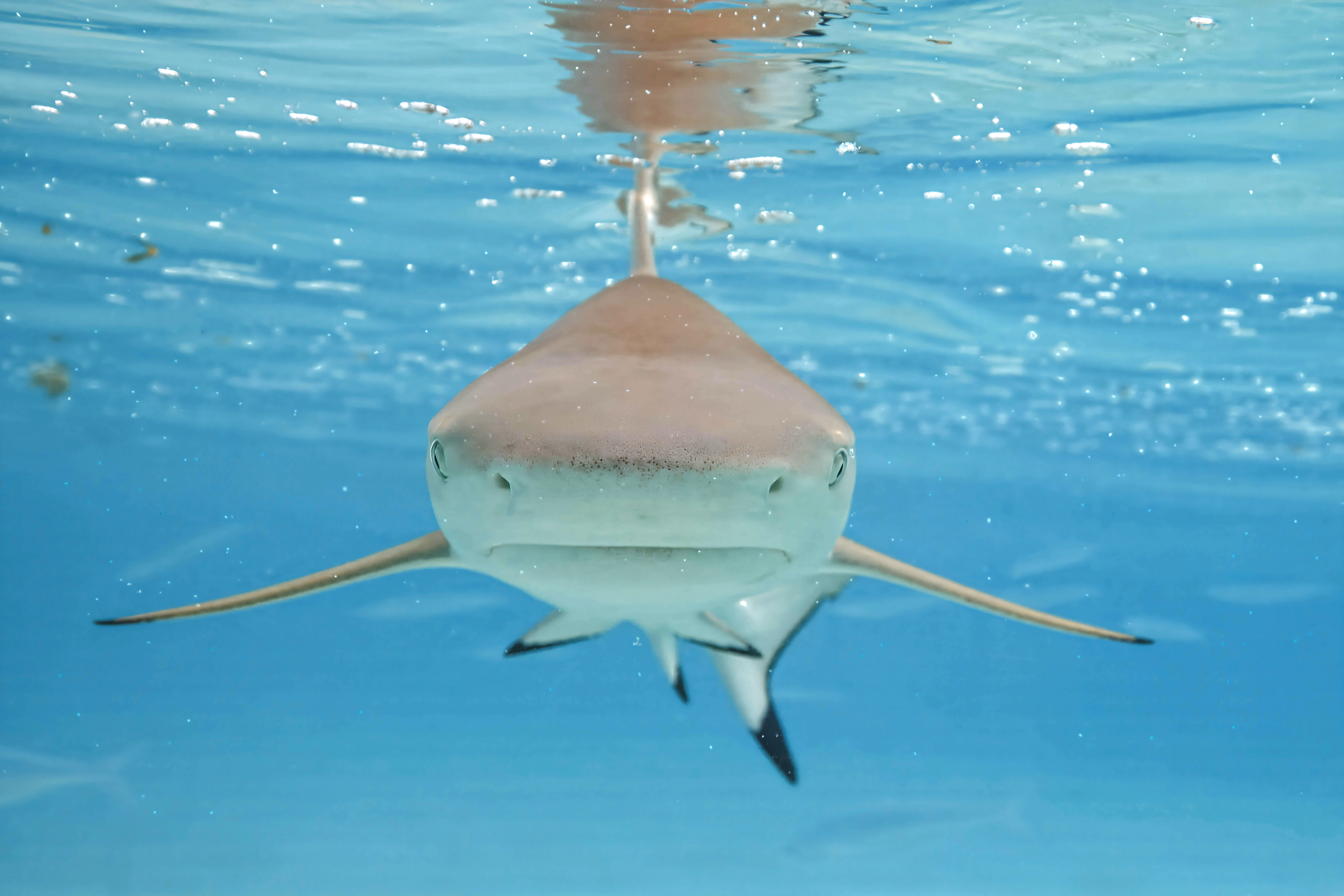


.jpg)
.jpg)
.jpg)
.jpg)


.JPG)
.JPG)


_Makiling.jpg)
_Makiling.jpg)
.jpg)
.jpg)


.jpg)
.jpg)


.jpg)
.jpg)
.jpg)
.jpg)
- Gallery: Commons:Featured_pictures/Places/Architecture/Exteriors#Nepal
- Info This set shows the Sansad Bhavan of Nepal, International Convention Centre, in New Baneshwar, Kathmandu, before and after the Gen Z protest in Nepal. The first image records the building in its normal condition, while the second image shows visible fire and smoke damage after the protest. The two photographs are connected by the same subject, similar viewpoint, and documentary purpose, together presenting a historically important before-and-after record of Nepal’s parliament building. -- created by Bijay Chaurasia – uploaded by Bijay Chaurasia – nominated by Bijay Chaurasia -- Bijay Chaurasia (talk) 09:21, 5 May 2026 (UTC)
- Support -- Bijay Chaurasia (talk) 09:21, 5 May 2026 (UTC)
- Strong support Extremely high illustrative value of an important event in Nepalese history. I would recommend submitting this as a valued image set as well. —brainandforce [yap] 11:40, 5 May 2026 (UTC)
- Valued image sets are not functioning now. Charlesjsharp (talk) 11:48, 5 May 2026 (UTC)
- Comment Image 1 needs perspective correction, and the WB needs to be adjusted --Uoaei1 (talk) 12:14, 5 May 2026 (UTC)
- And adjusment in the crop so that both images are similar Poco a poco (talk) 18:19, 5 May 2026 (UTC)
- Agree with Poco and Uoaei1 - there is FP potential here but this nomination would be improved by trying to match the crops between the two images much more closely. Cmao20 (talk) 01:04, 6 May 2026 (UTC)
- Thank you very much for the helpful review and suggestions. Based on the comments from @Poco a poco and @Uoaei1, I have uploaded a new version with perspective correction, white balance adjustment, and crop adjustment to make both images more visually similar. I hope the updated version addresses the concerns. Thank you again for the valuable feedback. -Bijay Chaurasia (talk) 06:51, 6 May 2026 (UTC)
- Support thanks for the fixes! UnpetitproleX (Talk) 20:15, 6 May 2026 (UTC)
- @Bijay Chaurasia and UnpetitproleX: Sorry, but the PC issue of the first image is
 Not done ( Oppose until then). I have allowed myself to add some more categories to both files. --Aciarium ⚒ (talk) 08:09, 7 May 2026 (UTC)
- Now Done @Aciarium Thank you! Bijay Chaurasia (talk) 08:47, 7 May 2026 (UTC)
- Still sightly tilted. ★ 16:32, 7 May 2026 (UTC)
- +1 Aciarium ⚒ (talk) 22:39, 8 May 2026 (UTC)
- Still sightly tilted. ★ 16:32, 7 May 2026 (UTC)
- Now
- @Bijay Chaurasia and UnpetitproleX: Sorry, but the PC issue of the first image is
- Thank you very much for the helpful review and suggestions. Based on the comments from @Poco a poco and @Uoaei1, I have uploaded a new version with perspective correction, white balance adjustment, and crop adjustment to make both images more visually similar. I hope the updated version addresses the concerns. Thank you again for the valuable feedback. -Bijay Chaurasia (talk) 06:51, 6 May 2026 (UTC)
- Agree with Poco and Uoaei1 - there is FP potential here but this nomination would be improved by trying to match the crops between the two images much more closely. Cmao20 (talk) 01:04, 6 May 2026 (UTC)
- Support Bijay, thanks for the fixes. Historic as per BaF. JayCubby (talk) 14:25, 6 May 2026 (UTC)
- Support -- Giles Laurent (talk) 22:53, 6 May 2026 (UTC)
- Support Historically important and very well executed --Kritzolina (talk) 07:30, 7 May 2026 (UTC)
- Support --Yann (talk) 09:14, 7 May 2026 (UTC)
- Support --Famberhorst (talk) 04:36, 8 May 2026 (UTC)
- Support -- Bwag (talk) 11:18, 8 May 2026 (UTC)
- Support —Vulcan❯❯❯Sphere! 23:49, 8 May 2026 (UTC)
Voting period ends on 14 May 2026 at 09:07:18 (UTC) (unless closed by the 5th-day rule)
Voters must check: File name · Quality · Image description · License · Categories (what, where, who, when)
Visit the nomination page to add or modify image notes.


- Gallery: Commons:Featured_pictures/Places/Architecture/Palaces
- Info The Narayanhiti Palace museum was created in 2008 from the complex of the former Narayanhiti Palace (or Narayanhiti Durbar 1963 AD) following the 2006 revolution.- created by Bijay Chaurasia – uploaded by Bijay Chaurasia – nominated by Bijay Chaurasia -- Bijay Chaurasia (talk) 09:07, 5 May 2026 (UTC)
- Support -- Bijay Chaurasia (talk) 09:07, 5 May 2026 (UTC)
- Comment The building is too hidden behind trees Poco a poco (talk) 18:20, 5 May 2026 (UTC)
- Thank you for your comment, @Poco a poco. I understand your concern that the building is partly hidden behind the trees. However, this image is intended to show the Narayanhiti Palace Museum within its wider landscape and urban setting, including the surrounding greenery and Kathmandu Valley background. In my view, the trees also help document the actual environment of the palace complex. Thank you again for the review. --Bijay Chaurasia (talk) 06:53, 6 May 2026 (UTC)
- Support Cmao20 (talk) 01:03, 6 May 2026 (UTC)

Voting period ends on 13 May 2026 at 19:28:42 (UTC) (unless closed by the 5th-day rule)
Voters must check: File name · Quality · Image description · License · Categories (what, where, who, when)
Visit the nomination page to add or modify image notes.


- Gallery: Commons:Featured pictures/Places/Architecture/Exteriors#Austria
- Info Benches in front of the Palm House of the Flower Gardens Hirschstetten, Vienna, Austria. All by me. --Aciarium ⚒ (talk) 19:28, 4 May 2026 (UTC)
- Support -- Aciarium ⚒ (talk) 19:28, 4 May 2026 (UTC)
- Weak oppose High quality and generally good photo but I do find the partially cropped red sign on the left to be distracting, and the light is a little harsh. Cmao20 (talk) 01:01, 6 May 2026 (UTC)
- Oppose per Cmao. //shb (t • c) 04:45, 6 May 2026 (UTC)
- @Cmao20 and SHB2000: Done Thank you for your feedback. I have removed the distracting barrier on the left and reduced the overall contrast to not make the light seem as harsh; please have another look! --Aciarium ⚒ (talk) 22:15, 6 May 2026 (UTC)
- @Cmao20 and SHB2000:
- Support Юрий Д.К. 06:50, 8 May 2026 (UTC)
- Support A lovely composition of a peaceful place -- JackyM59 (talk) 18:59, 8 May 2026 (UTC)
- Support —Vulcan❯❯❯Sphere! 23:48, 8 May 2026 (UTC)
- Support --MZaplotnik(talk) 14:02, 9 May 2026 (UTC)

Voting period ends on 13 May 2026 at 15:39:27 (UTC) (unless closed by the 5th-day rule)
Voters must check: File name · Quality · Image description · License · Categories (what, where, who, when)
Visit the nomination page to add or modify image notes.


- Gallery: Commons:Featured pictures/Places/Architecture/Exteriors#Belgium
- Info created by JackyM59 – uploaded by JackyM59 – nominated by JackyM59 -- JackyM59 (talk) 15:39, 4 May 2026 (UTC)
- Support -- JackyM59 (talk) 15:39, 4 May 2026 (UTC)
- Support Cmao20 (talk) 15:50, 4 May 2026 (UTC)
- Comment Nice, but I would cut out the railing at right. Yann (talk) 16:33, 4 May 2026 (UTC)
- Comment Thanks for the advice. I just cropped it and it's true that it highlights the historical monuments more while still maintaining a good foreground. -- JackyM59 (talk) 18:34, 4 May 2026 (UTC)
- Support Painterly. Yann (talk) 21:53, 4 May 2026 (UTC)
- Oppose Interesting building but hazy landscape and unappealing light. The lower right corner is also too busy in the composition -- Basile Morin (talk) 03:37, 6 May 2026 (UTC)
- Support --Llez (talk) 08:05, 6 May 2026 (UTC)
- Comment Nice busy picture with a lot to see but in the cropped version the foreground is much more embarrassing. I would have supported the original picture. --Selbymay (talk) 20:56, 6 May 2026 (UTC)
- Support Юрий Д.К. 06:50, 8 May 2026 (UTC)
- Support --MZaplotnik(talk) 14:00, 9 May 2026 (UTC)

Voting period ends on 13 May 2026 at 10:12:47 (UTC) (unless closed by the 5th-day rule)
Voters must check: File name · Quality · Image description · License · Categories (what, where, who, when)
Visit the nomination page to add or modify image notes.


- Gallery: Commons:Featured_pictures/Animals/Birds/Passeriformes#Family : Alaudidae (Larks)
- Info created by Skander zarrad – uploaded by Skander zarrad – nominated by TOUMOU -- Mounir TOUZRI (talk) 10:12, 4 May 2026 (UTC)
- Support -- Mounir TOUZRI (talk) 10:12, 4 May 2026 (UTC)
- Support There is another FP which is a good picture and should stay FP, but I think this one is different enough to be promoted too. Cmao20 (talk) 10:54, 4 May 2026 (UTC)
- Oppose Too hidden by the foreground.--S. DÉNIEL (talk) 12:36, 4 May 2026 (UTC)
- Oppose per S. DÉNIEL --Milseburg (talk) 13:39, 4 May 2026 (UTC)
- Support The lighting is exceptional and the composition works quite well for me.--Νικόλαος Κυριακάκης (talk) 10:38, 5 May 2026 (UTC)
- Support I think the subject blending the foreground is a good illustration of why it has that particular coloration. It's not at the point where it detracts from the image quality, IMO. —brainandforce [yap] 11:30, 5 May 2026 (UTC)
- Oppose Per above, I also find such big blurry area in the foreground disturbing Poco a poco (talk) 18:30, 5 May 2026 (UTC)
- Weak oppose If it weren't for the distracting foreground! --Aciarium ⚒ (talk) 16:18, 6 May 2026 (UTC)


Voting period is over. Please don't add any new votes.Voting period ends on 12 May 2026 at 13:17:21 (UTC) (unless closed by the 5th-day rule)
Voters must check: File name · Quality · Image description · License · Categories (what, where, who, when)
Visit the nomination page to add or modify image notes.


- Gallery: Commons:Featured pictures/Animals/Mammals#Family_:_Equidae_(Equids)
- Info created and uploaded and nominated by XRay -- XRay 💬 13:17, 3 May 2026 (UTC)
- Support -- XRay 💬 13:17, 3 May 2026 (UTC)
- Support Since my time as a "horse-crazy girl" I am fascinated with the wild horses of Dülmen. I admire all the pictures you are taking of them and this is an especially charming one --Kritzolina (talk) 14:01, 3 May 2026 (UTC)
- Support A sensitive and beautiful photograph Cmao20 (talk) 14:32, 3 May 2026 (UTC)
- Support -Nayan j Nath (talk) 14:56, 3 May 2026 (UTC)
- Support per above. JayCubby (talk) 18:23, 3 May 2026 (UTC)
- Support --The Cosmonaut (talk) 21:40, 3 May 2026 (UTC)
- Support--Agnes Monkelbaan (talk) 09:15, 4 May 2026 (UTC)
- Support --Berthold Werner (talk) 15:14, 4 May 2026 (UTC)
- Support --Famberhorst (talk) 15:40, 4 May 2026 (UTC)
- Support as per Cmao20. -- Radomianin (talk) 07:08, 5 May 2026 (UTC)
 Weak support Nice but pretty soft Poco a poco (talk) 18:34, 5 May 2026 (UTC)

- I improved the sharpness a little bit. -- XRay 💬 19:07, 6 May 2026 (UTC)
- Support --Llez (talk) 07:59, 6 May 2026 (UTC)
- Oppose Per Poco; could be sharper. --Aciarium ⚒ (talk) 16:26, 6 May 2026 (UTC)
- I should probably mention that I've since improved the sharpness. -- XRay 💬 19:18, 6 May 2026 (UTC)
- Thanks for the update, but I am afraid that it still doesn't convince me. -- Aciarium ⚒ (talk) 10:27, 11 May 2026 (UTC)
- I should probably mention that I've since improved the sharpness. -- XRay 💬 19:18, 6 May 2026 (UTC)
- Support Nice scene, I confess the eye discharge is distracting me a little --Wilfredor (talk) 19:05, 6 May 2026 (UTC)
- As for the eye discharge, I had initially considered removing it digitally, but these are wild horses, and that’s just part of being a horse. -- XRay 💬 19:11, 6 May 2026 (UTC)
- I think it was good to leave it, it was not a criticism to remove it, I understand that it is part of a natural scene to see this, I appreciate your explanation and your courage in not editing it Wilfredor (talk) 19:26, 6 May 2026 (UTC)
- In this context, I should perhaps mention that visitors are not allowed to touch (pet) or feed the horses. Contact with humans has been significantly reduced, and only a few photography groups are now permitted to get so close to the horses. -- XRay 💬 19:16, 6 May 2026 (UTC)
- As for the eye discharge, I had initially considered removing it digitally, but these are wild horses, and that’s just part of being a horse. -- XRay 💬 19:11, 6 May 2026 (UTC)
- Support -- Giles Laurent (talk) 22:50, 6 May 2026 (UTC)
- Support --GRDN711 (talk) 04:30, 7 May 2026 (UTC)
- Support First, I didn't understand that these are wild horses. --Yann (talk) 09:16, 7 May 2026 (UTC)
- Support --Kiril Simeonovski (talk) 14:20, 8 May 2026 (UTC)
- Support Poetic, sensitive, and interesting composition. – Aristeas (talk) 18:44, 8 May 2026 (UTC)
- Support per Kritzolina and Aristeas, very charming and nice composition. --Achim Lammerts • Syntaxys (talk) 13:20, 12 May 2026 (UTC)
Voting period is over. Please don't add any new votes.Voting period ends on 12 May 2026 at 12:36:36 (UTC) (unless closed by the 5th-day rule)
Voters must check: File name · Quality · Image description · License · Categories (what, where, who, when)
Visit the nomination page to add or modify image notes.


- Gallery: Commons:Featured pictures/Objects/Vehicles/Air transport#Aerostats
- Info created by New York-air – uploaded by New York-air – nominated by New York-air -- New York-air (talk) 12:36, 3 May 2026 (UTC)
- Support -- New York-air (talk) 12:36, 3 May 2026 (UTC)
- Support because of the lady waving out the window, it makes the whole image, and it made me laugh :) LetmeEditit (talk) 15:55, 3 May 2026 (UTC)
- Support, but NYA, please reduce the chroma noise. JayCubby (talk) 18:28, 3 May 2026 (UTC)
- Comment Thank you JC, I reduced the chroma noise now, is it better? -New York-air (talk) 06:06, 4 May 2026 (UTC)

- Support Yes, it is, and it's sufficiently better to get me to support too Cmao20 (talk) 10:56, 4 May 2026 (UTC)
- Very much so. Thank you. JayCubby (talk) 12:30, 4 May 2026 (UTC)
- Support --MZaplotnik(talk) 15:39, 5 May 2026 (UTC)
- Support --Llez (talk) 07:59, 6 May 2026 (UTC)
- Weak support I would like it more if it were sharper and had more contrast, but the composition is exciting—the wow factor exceeds the technicalities. --Aciarium ⚒ (talk) 16:29, 6 May 2026 (UTC)
- Hi Aciarium, thank you for your support. I uploaded a version with more contrast, maybe you can take a look -New York-air (talk) 19:17, 8 May 2026 (UTC)
- @New York-air: Thanks, it is a bit better now. Actually, the "problem" with the contrast comes from the lighting conditions while shooting (the motif is backlit) rather than from post processing. I still appreciate the effort. --Aciarium ⚒ (talk) 15:43, 9 May 2026 (UTC)
- Hi Aciarium, thank you for your support. I uploaded a version with more contrast, maybe you can take a look -New York-air (talk) 19:17, 8 May 2026 (UTC)
- Support —Vulcan❯❯❯Sphere! 23:45, 8 May 2026 (UTC)

Voting period is over. Please don't add any new votes.Voting period ends on 12 May 2026 at 08:26:46 (UTC) (unless closed by the 5th-day rule)
Voters must check: File name · Quality · Image description · License · Categories (what, where, who, when)
Visit the nomination page to add or modify image notes.


- Gallery: Commons:Featured pictures/Animals/Birds/Passeriformes#Family_:_Cisticolidae_(Cisticolas)
- Info All by -- Tisha Mukherjee (talk) 08:26, 3 May 2026 (UTC)
- Support -- Tisha Mukherjee (talk) 08:26, 3 May 2026 (UTC)
- Support A charming little bird caught just right --Kritzolina (talk) 13:53, 3 May 2026 (UTC)
- Support per Kritzolina Cmao20 (talk) 14:31, 3 May 2026 (UTC)
- Support--Paracel63 (talk) 21:40, 4 May 2026 (UTC)
- Support --Yann (talk) 09:43, 5 May 2026 (UTC)
- Support --Llez (talk) 07:58, 6 May 2026 (UTC)
- Support -- Giles Laurent (talk) 22:49, 6 May 2026 (UTC)
- Support per Kritzolina. – Aristeas (talk) 18:43, 8 May 2026 (UTC)
- Support —Vulcan❯❯❯Sphere! 23:45, 8 May 2026 (UTC)


Timetable (day 5 after nomination)
Thu 07 May → Tue 12 May
Fri 08 May → Wed 13 May
Sat 09 May → Thu 14 May
Sun 10 May → Fri 15 May
Mon 11 May → Sat 16 May
Tue 12 May → Sun 17 May
Timetable (day 9 after nomination, last day of voting)
Sun 03 May → Tue 12 May
Mon 04 May → Wed 13 May
Tue 05 May → Thu 14 May
Wed 06 May → Fri 15 May
Thu 07 May → Sat 16 May
Fri 08 May → Sun 17 May
Sat 09 May → Mon 18 May
Sun 10 May → Tue 19 May
Mon 11 May → Wed 20 May
Tue 12 May → Thu 21 May
Closing nominations manually
The following description explains how to close nominations manually. Normally this is not necessary, as FPCBot takes care of counting the votes, closing and archiving the nominations. When the Bot has counted the votes, a user needs to check and approve the result; everything else is done by the Bot. Therefore, the following instructions are normally only needed for delist-and-replace nominations that the Bot cannot (yet) process, and in case the Bot malfunctions. The closing can be done by any experienced user. If you need help, just ask on the FPC talk page.
Closing a featured picture nomination
- On Commons:Featured picture candidates/candidate list click on the title/link of the nomination, then [edit].
- Add the result of the voting at the bottom (on a new line):
{{FPC-results-reviewed|support=x|oppose=x|neutral=x|featured=(“yes” or “no”)|gallery=xxx|sig=~~~~}}
(You can leave thegalleryparameter blank if the image was not featured. If the nomination contains alternatives, you must add thealternative=xxxparameter with the name of the selected image between thegalleryand thesigparameter. See {{FPC-results-reviewed}} for examples and more explanations.) - Edit the title of the nomination and add
featuredornot featuredafter the link – for example:
=== [[:File:XXXXX.jpg]] ===
becomes
=== [[:File:XXXXX.jpg]], featured === - Save your edit.
- Add the result of the voting at the bottom (on a new line):
- If it is featured:
- Add the picture to the list of the four most recently featured pictures of an appropriate gallery of Commons:Featured pictures, list as the first one and delete the last one, so that the number is four again.
- Add the picture to the appropriate featured picture gallery page and section. Click on the most appropriate link beneath where you just added it as one of the four images on Commons:Featured pictures, list to find the gallery page, and search for the correct section. (An image should only appear ONE time in the galleries. After a successful nomination, the image can be placed in several of the Featured pictures categories.)
- Add the template
{{Assessments|featured=1}}to the image description page.- If it was an alternative image or part of a set nomination, use the
com-nomparameter. For example, if File:Foo.jpg was promoted in the nominationCommons:Featured picture candidates/File:Bar.jpg, use{{Assessments|featured=1|com-nom=Bar.jpg}}You also need thecom-nomparameter if the image gets renamed. - If the image is already featured on another Wikipedia, just add
featured=1to the {{Assessments}} template. For instance,{{Assessments|enwiki=1}}becomes{{Assessments|enwiki=1|featured=1}}
- If it was an alternative image or part of a set nomination, use the
- Head over to the structured data for the image and add the “Commons quality assessment” claim (P6731) “Wikimedia Commons featured picture” (Q63348049).
- Add the picture to the chronological archives of featured pictures. Place it at the end of the gallery using this format:
File:xxxxx.jpg|# '''Title'''<br>created by [[User:xxxxx|xxxxx]], uploaded by [[User:xxxxx|xxxxx]], nominated by [[User:xxxxx|xxxxx]]<br> {{s|xxx}}, {{o|xxx}}, {{n|xxx}}- The
#should be replaced by 1 for the first image nominated that month, and counts up after that. Have a look at the other entries on that page for examples. (If you want to do everything perfectly, link that number to the nomination subpage, just like FPCBot does this. It allows users to jump directly to the nomination.) - The
Titleshould be replaced by the bare name of the featured picture, without the ‘File:’ or the file extension (such as .jpg .tif .svg). - The
xin{{s|x}}, {{o|x}}, {{n|x}}should be replaced by the count of support, oppose, and neutral votes respectively. - If the nomination was a set nomination, use this format:
File:xxxxx.jpg|# '''Set: Title (Z files)'''<br>created by [[User:xxxxx|xxxxx]], uploaded by [[User:xxxxx|xxxxx]], nominated by [[User:xxxxx|xxxxx]]<br> {{s|x}}, {{o|x}}, {{n|x}}
Replace theZin(Z files)by the count of images in the set, and use the name of the first image from the set instead ofFile:xxxxx.jpgand for the title.
- The
- Add
== FP promotion ==
{{FPpromotion|File:XXXXX.jpg}}to the talk page of the nominator. For set nominations, use:== Set Promoted to FP ==, using the names of the set files instead of the XXXXXX and the title of the set instead of YYYYY.
<gallery>
File:XXXXXX.jpg
File:XXXXXX.jpg
</gallery>
{{FPpromotionSet2|YYYYY}} - Add
== FP promotion ==
{{FPpromotedUploader|File:XXXXX.jpg}}to the talk page of the user who has uploaded the image, if that user is not the same as the nominator. - Add
== FP promotion ==
{{FPpromotedCreator|File:XXXXX.jpg}}to the talk page of the creator, if the author is a different Commons user than nominator and uploader.
- Add candidate archive categories to the nomination so that people can easily find and evaluate past nominations (this applies also to unsuccessful, {{FPX}}-d, {{FPD}}-d and {{Withdraw}}-n nominations). It’s best practice to wrap all these categories in a
<noinclude>...</noinclude>section because they apply only to the nomination itself, not to the log page etc. which transclude it. You need three or four categories:- A category for the month and year, like Category:May 2026 featured picture candidates for the current month.
- A category for the type and result of the nomination, like Category:2026 successful candidates for featured picture status; replace “successful” by “unsuccessful”, “FPXed”, “FPDed” or “withdrawn”, depending on the final result of the nomination (see the supercategory for common values).
- A category for the subject of the nomination, like Category:2026 featured picture candidates of plants. Replace “plants” by one of the possible subject keywords like “animals”, “architecture”, etc.; see the base category for all common keywords. Basically the subject keywords correspond to the first part of the gallery link.
- If the nomination is a set nomination, add Category:2026 featured picture set nominations.
- As the last step (whether the image is featured or not; including {{FPX}}-d, {{FPD}}-d and {{Withdraw}}-n nominations), you have to move the transclusion (the {{ }} and the text within those) of the nomination to the current log page.
- To find the current log page, visit the first page of the log for this month. If the header of that page contains a link with the text “Next part of this month”, the log for this month has been split into several parts because it contains too many entries. Click on the “Next part …” link and repeat this until you reach a page where the header does not offer a “Next part …” link; that’s the last and current log page.
- Now open Commons:Featured picture candidates/candidate list, click on [edit], and find the transclusion of the nomination you are closing. It will be of the form:
{{Commons:Featured picture candidates/File:XXXXX.jpg}}or:{{Commons:Featured picture candidates/Set/XXXXX}}. - Copy that line to the bottom of the current log page and save that page. Then remove the same line from the candidate list and save that page.
Closing a delisting nomination
- On Commons:Featured picture candidates/candidate list click on the title/link of the candidate image, then [edit].
Add the result of the voting at the bottom (on a new line):{{FPC-delist-results-reviewed|delist=x|keep=x|neutral=x|delisted=yes/no|sig=~~~~}}
(for example see Commons:Featured picture candidates/removal/File:Ensifera ensifera (22271195865).jpg) - Edit the title of the delisting nomination and add
delistedornot delistedafter the image title; for example:=== [[:File:XXXXX.jpg]] ===
becomes=== [[:File:XXXXX.jpg]], delisted === - Add candidate archive categories to the nomination; this works the same way as described above for featured picture nominations. The only difference is that the category for type and status must be of the form Category:2026 successful candidates for delisting from featured picture status, or Category:2026 successful candidates for delisting and replacing featured pictures if this is a delist-and-replace nomination. Substitute “unsuccessful”, “FPXed”, “FPDed” or “withdrawn” for “successful”, depending on the final result of the nomination.
- Move the transclusion of the nomination to the current log page; please see above for an explanation how to find the current log page and how to move the nomination to it.
- If the outcome was not delisted, stop here. If it is delisted:
- Remove the picture from Commons:Featured pictures, list and any subpages.
- Edit the picture's description as follows:
- In the {{Assessments}} template on the image description page, change
featured=1tofeatured=2(do not remove the {{Assessments}} template; do not change anything related to its status in other featured picture processes). If the image description page uses the old {{Featured picture}} template, replace it with{{Assessments|featured=2}}. - Remove the image from all categories beginning with "Featured [pictures]" (example: Featured night photography, Featured pictures from Wiki Loves Monuments 2016, Featured pictures of Paris); but not from categories about featured pictures on specific Wikipedia editions, like Category:Featured pictures on Wikipedia, English.
- Remove the "Commons quality assessment" claim (P6731) "Wikimedia Commons featured picture" (Q63348049) from the picture's Structured data.
- In the {{Assessments}} template on the image description page, change
- Add a delisting-comment to the original entry in the chronological archive of featured pictures in bold-face, e. g. delisted 2007-07-19 (1–6) with (1–6) meaning 1 keep and 6 delist votes (change as appropriate). The picture must not be removed from the chronological archives.
- If this is a Delist and Replace, the delisting and promotion must both be done manually. To do the promotion, follow the steps in the section above. Note that the assessment tag on the file page and the promotion tag on the nominator's talk page won't pick up the /replace subpage that these nominations use.
.jpg)
Archiving a withdrawn nomination
If a nomination has been withdrawn by the nominator by using {{Withdraw}} or is cancelled with {{FPX}} or {{FPD}}, wait 24 hours after the nomination was last edited. If there has been no objection to the cancellation within this time, the nomination can simply be archived. Just add candidate archive categories to the nomination itself, then move the transclusion of the nomination to the current log page; please see above for an explanation how to find the current log page and how to move the nomination to it.